Square AI covers · title and artist in quotes

AI Cover Art Generator

Type the release title, the artist name and the sound you want people to feel. The AI cover art generator paints a square cover with the words set cleanly, ready for a single, an EP, a podcast or a playlist.

  • 8 free credits when you sign up
  • 4 more free credits every day
  • No watermark
Add a photo to edit it (optional)

Best for text in images: posters, signs and labels.

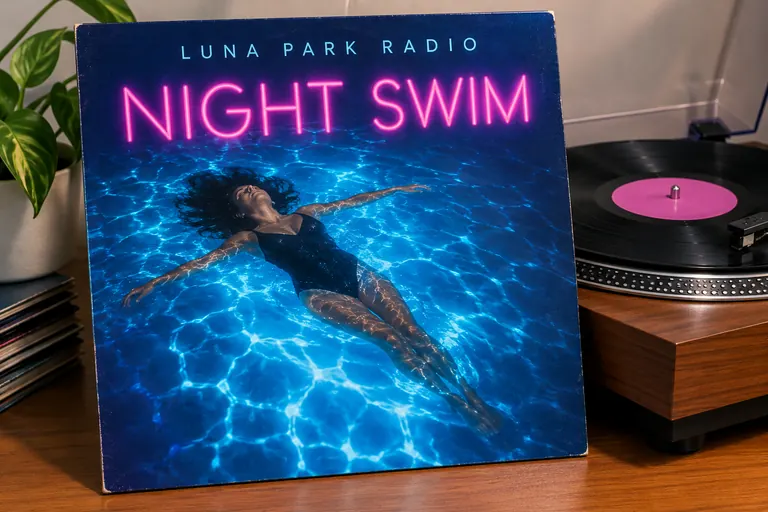
Synth-pop album cover titled Night Swim on a vinyl sleeve next to a turntable, made with an AI cover art generator
Example · Synth-pop album

Covers made with the AI cover art generator

Every AI cover below came from one prompt with a made-up title and artist name in quotes. Tap “Use this prompt” and put in your own release.

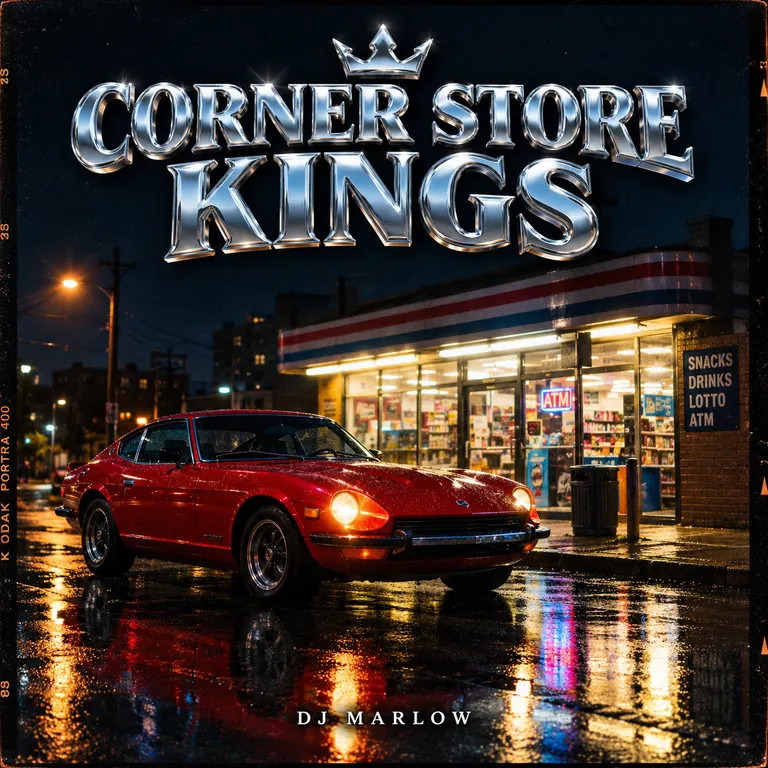
  • Hip-hop single cover titled Corner Store Kings with a red car outside a corner store at night
    Hip-hop single

    “Square cover art for a hip-hop single. Title “Corner Store Kings” in heavy chrome letters and the artist name “DJ Marlow” in small white type at the bottom. A vintage red sports car parked outside a lit corner store at night, wet street reflections, 35mm film look, clean readable typography kept well inside the edges.”

  • Podcast cover titled Salt and Smoke with a cast-iron pan of charred peppers on a dark table
    Podcast cover

    “Square podcast cover for a cooking show called “Salt & Smoke” with the line “Weekly stories from home kitchens” underneath. A cast-iron pan of charred peppers on a dark wood table, warm side light, bold cream title letters that stay readable at small sizes and set away from the edges.”

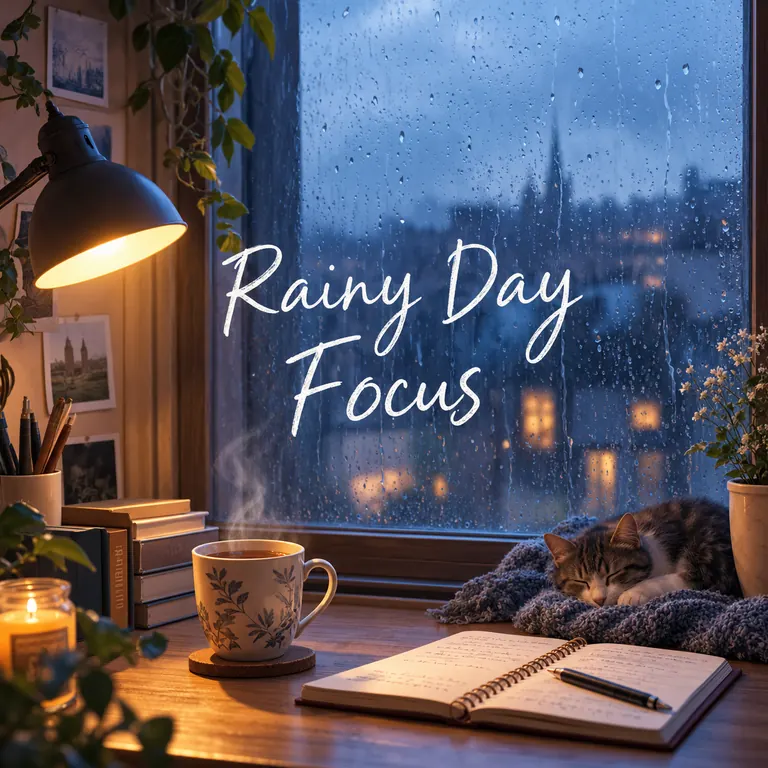
  • Lo-fi playlist cover titled Rainy Day Focus with a cozy desk by a rainy window
    Playlist cover

    “Square playlist cover titled “Rainy Day Focus” in soft white handwritten letters. A cozy desk by a rain-streaked window with a lamp, a mug of tea and an open notebook, muted blue and amber tones, lo-fi illustration style, clean readable typography with wide margins around the text.”

What you can make with this AI cover art generator

Your AI cover art is seen as a thumbnail first: a small square in a streaming app, a podcast list or a shared link. That means one strong image, a short title and letters that hold up at the size of a stamp.

Album, single and EP covers

Give each release its own AI cover art, from a moody album cover to a quick single you drop next week. Name the genre and the feeling; colors and type follow.

  • Keep the title under five words
  • Put the artist name in quotes too
  • Pick 4K for the AI cover you send to a distributor

Podcast and audiobook covers

Show art has to say what the show is about at a glance. A clear object, a bold title and one short line beat a busy scene.

  • Say “readable at small sizes” in the prompt
  • Use high contrast between title and background
  • Try the same prompt twice and compare them side by side

Playlist and mixtape covers

A custom cover makes a shared playlist for running, studying or a road trip look finished. Match the art to the mood of the music.

  • Describe a place or a time of day
  • Name a style: “lo-fi illustration”, “grainy photo”
  • Make a set with the same colors for a series

How to make a cover with the AI cover art generator

  1. 1

    Write the title and artist name

    Put the release title and the artist or show name in quotes, spelled exactly as they should read. Leave off web addresses and social handles; many stores reject them.

  2. 2

    Describe the image and sound

    Describe one main image, the colors and the letter style, e.g. “red car at night, chrome letters, 35mm film look”. The square 1:1 shape is preset for covers.

  3. 3

    Keep a model that handles text

    GPT Image 2.5 is selected by default because it keeps lettering clean. Nano Banana 2 is another good choice. Add your own band photo with the + tile if you want to appear on the cover.

  4. 4

    Check it small, then download

    Most AI covers are ready within a few minutes (free accounts wait at least 2 minutes on premium models). Shrink the preview to thumbnail size, check the spelling, then download.

Tips for AI cover art that works as a thumbnail

  1. 01

    Test it at thumbnail size

    If the title disappears when the image is shrunk, ask for bigger letters or drop the tagline.

  2. 02

    One subject, one color story

    A red car on a dark street reads fast. Two or three main colors look stronger than a rainbow.

  3. 03

    Match the art to the genre

    Grainy film for hip-hop and indie, neon and chrome for synth-pop, soft pastels for lo-fi, bold flat shapes for podcasts.

  4. 04

    Keep a series consistent

    For singles from one album or weekly episodes, reuse the prompt and change only the title and one detail.

An AI cover art generator built for small squares

Cover art lives mostly as a small square beside a play button, so it has to be clear before it is clever. An AI cover art generator helps when the music is ready but you have no designer: describe the image, the mood and the exact words, and the model draws picture and lettering together.

This page starts on GPT Image 2.5, the model on our site that follows long instructions most closely and keeps titles and names readable. Use it as an AI album art generator for records and singles, or switch models: Nano Banana 2 handles text well, and Seedream models are strong on rich color and painterly styles.

New accounts get 8 free credits, then 4 more every day from the second day. AI cover art with GPT Image 2.5 costs 3 credits at 1K, 4 at 2K and 7 at 4K, and the exact cost shows next to the Generate button before anything is spent. Pick 4K for release files and check your distributor’s minimum size.

The AI covers you make download at full size with no watermark, may be used for commercial releases and save privately to My Images. Use your own artist name, not the name, face or logo of a famous act, and keep to our content policy: no sexual content, minors or images meant to deceive or harass.

AI cover art generator FAQ

Is the AI cover art generator free?

You can start for free. New accounts get 8 credits and 4 more every day from the second day, enough for a 1K cover with GPT Image 2.5 at 3 credits. The free FLUX.2 model works for covers without text.

Can I use AI cover art on streaming services?

Yes. Covers from the AI cover art generator carry no watermark and may be used commercially. Check your distributor’s rules on size and text before you upload.

Will my title and artist name be spelled correctly?

Usually, when they are short and in quotes. GPT Image 2.5 is the default because it handles lettering best among our models. Long taglines and tiny text are where mistakes appear, so proofread and rerun if needed.

Can I put a photo of my band on the cover?

Yes. Add photos with the + tile and describe the scene around them. For the most faithful faces choose Nano Banana 2 or Nano Banana Pro. Only use photos of adults who agree to it.

Does it work as an AI album art generator for vinyl or CD?

Yes. Make the front cover at 4K in the square shape. For a back cover, run a second prompt in the same style with a short track list.

Can I copy the style of a famous album cover?

Describe the mood and technique instead, e.g. “grainy 1970s photo, bold serif title”. Covers that copy a real album, artist or logo are not allowed.

Make your cover now

Type the title and artist name in quotes, describe the mood, and the AI cover art generator hands back a square cover in a few minutes.

Start creating