
FLUX 3 Image Is Out: Release Date, What Changed, How to Try
The FLUX 3 release date varies by model: Image launched October 1, 2026. See the timeline, a four-model comparison, editing examples and access options.
The FLUX 3 release date depends on which model you mean. Black Forest Labs announced the FLUX 3 family on July 23, 2026, opened FLUX 3 Video on August 4 and released FLUX 3 Image on October 1. FLUX 3 Image generates and edits images with up to ten references, through the BFL API, the Playground and third-party apps. Our AI photo generator runs other image models, not FLUX 3 Image.
Last updated: October 2, 2026 · about 6 min read
FLUX 3 Image has no open-weights release as of October 2, 2026. Its reference and layout controls are the best reasons to try it. For a single prompt, several models do well, and the bookshop test below shows where they differ.
FLUX 3 release date: what came out when
The name "FLUX 3" covers a family announced in July and several models released afterward. The image release has its own date.
| Date (2026) | What Black Forest Labs released | Can you use it today? |
|---|---|---|
| July 23 | FLUX 3 announced as a multimodal family covering image, video, audio and action | Announcement |
| August 4 | FLUX 3 Video, part 1: generation | Generally available through the BFL API and selected partners |
| September 23 | FLUX 3 Action, a 7B open-weights action model for robots and games | Yes, open weights |
| October 1 | FLUX 3 Image | Yes, through the BFL API, the BFL Playground and partner platforms |
So yes, FLUX 3 is out: BFL's August 4 video announcement made video generation generally available through its API, and the image model followed on October 1. FLUX 3 Action has open weights; FLUX 3 Image doesn't, so for most people using it means an API or a web app.
FLUX 3 Image references, layout and editing controls
These come from BFL's FLUX 3 Image documentation. Our example below uses two of them, references and a targeted edit:
- Up to ten reference images. You send them in order and refer to them by position ("the van in image 2"). Each reference can supply something different: a product, a person, a background, a style.
- Bounding boxes for layout. You can add boxes to the end of a prompt, written as
[top, left, bottom, right]on a 0 to 1000 grid, to say where each element goes. The same boxes work for edits: recolor, move, replace or remove one element. - Targeted edits. You write the change as an instruction and name what should stay. In our bicycle edit, the sign, the chalkboard and the sleeping cat came through unchanged.
- Resolution options. BFL's API offers 768sq, 1K, 1.5K, 2K and 4K tiers. Third-party platforms may expose a different list.
- Web grounding. BFL's API can search the web and images before generating, to get real things right. It's on by default and you can switch it off.
One model handles both generation and editing, so there's no separate "edit" or "fill" model to pick, as there was with FLUX.1 Kontext and Fill.
Same prompt, four models: FLUX 3 Image vs. what you can use here
We ran one prompt through FLUX 3 Image and three models available in AI Photo Generator. Every request used the same text and a 4:3 frame. FLUX 3 Image, Nano Banana 2 and GPT Image 2.5 used their 1K settings; Seedream 5 Pro used basic quality. Each shown result came from one attempt.
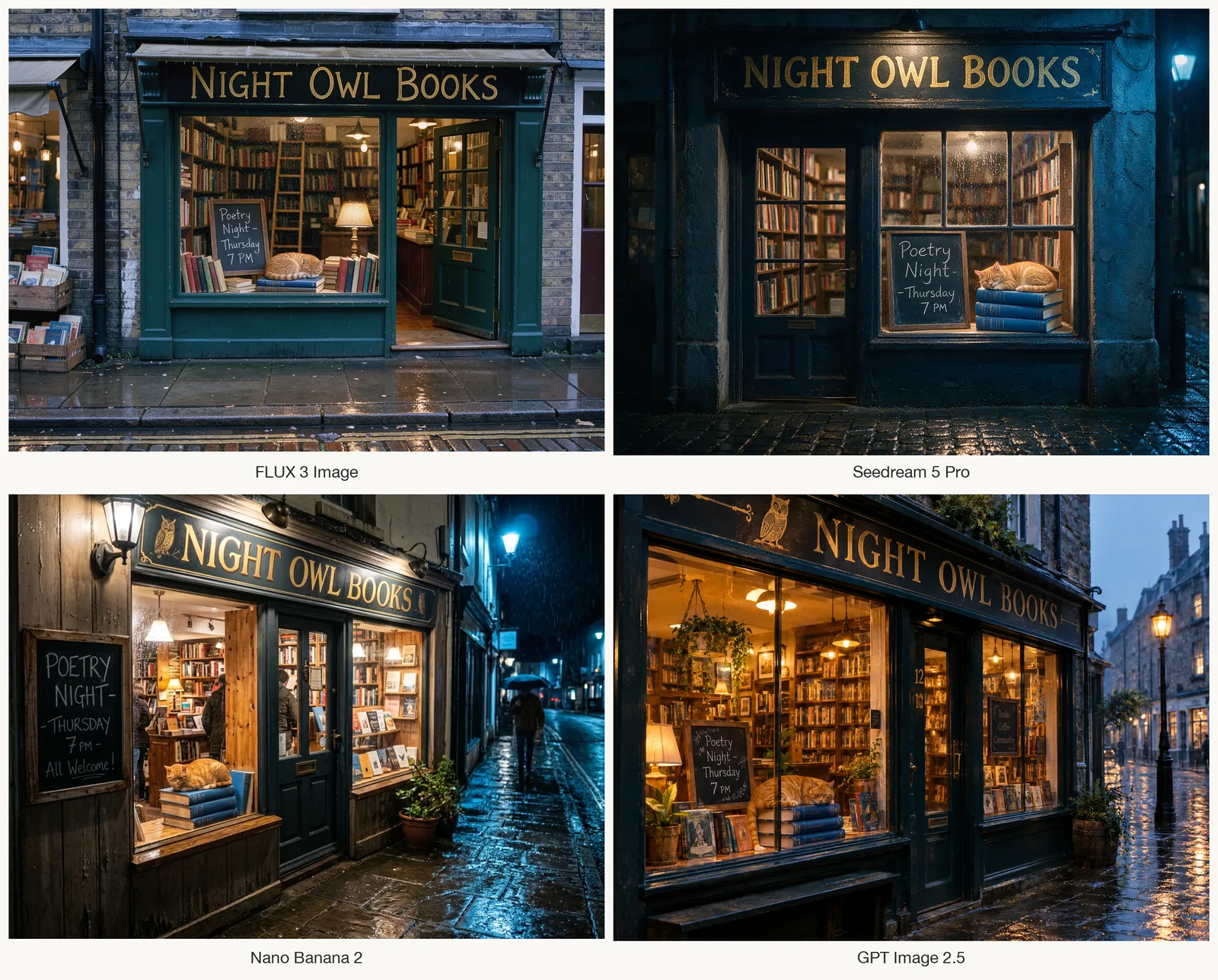
Prompt: A small independent bookshop on a rainy evening, seen from the sidewalk. A hand-painted gold sign above the door reads "NIGHT OWL BOOKS". In the window, a chalkboard says "Poetry Night - Thursday 7 PM". A ginger cat sleeps on a stack of three blue hardcover books in the window display. Warm light inside, cool blue street light outside, wet cobblestones reflecting the glow. 35mm photo, realistic.
The hero grid shows FLUX 3 Image (top left), Seedream 5 Pro (top right), Nano Banana 2 (bottom left) and GPT Image 2.5 (bottom right). These observations apply to the four images shown:
| Check | FLUX 3 Image | Seedream 5 Pro | Nano Banana 2 | GPT Image 2.5 |
|---|---|---|---|---|
| Shop name spelled correctly | Yes | Yes | Yes | Yes |
| Chalkboard wording | Requested words present | Requested words present | Adds "All Welcome!"; board is outside the window | Requested words present; adds a separate sign |
| Cat on three blue books | Mixed-color stack | Three blue books | Three blue books | Three blue books |
| Rainy evening mood | Reads more like dusk | Strong night mood | Strongest rain and night | Blue-hour evening |
| Overall look | Most like a real street photo | Moody, polished | Dramatic | Storybook warm |
All four rendered the requested words legibly, but text placement and extra wording differed. FLUX 3 Image looks closest to an ordinary street photo to us, while Seedream 5 Pro follows the requested night lighting and three blue books more closely. FLUX 3's scene looks lighter than the requested rainy evening, and its book stack includes other colors. One scene can't establish which model handles text or realism most reliably; you can compare available alternatives in our realistic AI image generator.
Combining two references in FLUX 3 Image
For a two-reference edit, we used the FLUX 3 bookshop as image 1 and a separately generated red bicycle as image 2. The instruction asked for the bike just left of the shop door, with the original scene preserved.
Prompt: Place the red bicycle with the sunflower basket from image 2 on the sidewalk in front of the bookshop in image 1, leaning on its kickstand just left of the shop door. Match the lighting, wet-pavement reflections and perspective of image 1. Keep everything else in image 1 unchanged, including the sign, the chalkboard and the cat.
Settings: FLUX 3 Image edit, 2 references, 1K, aspect ratio auto (taken from image 1).
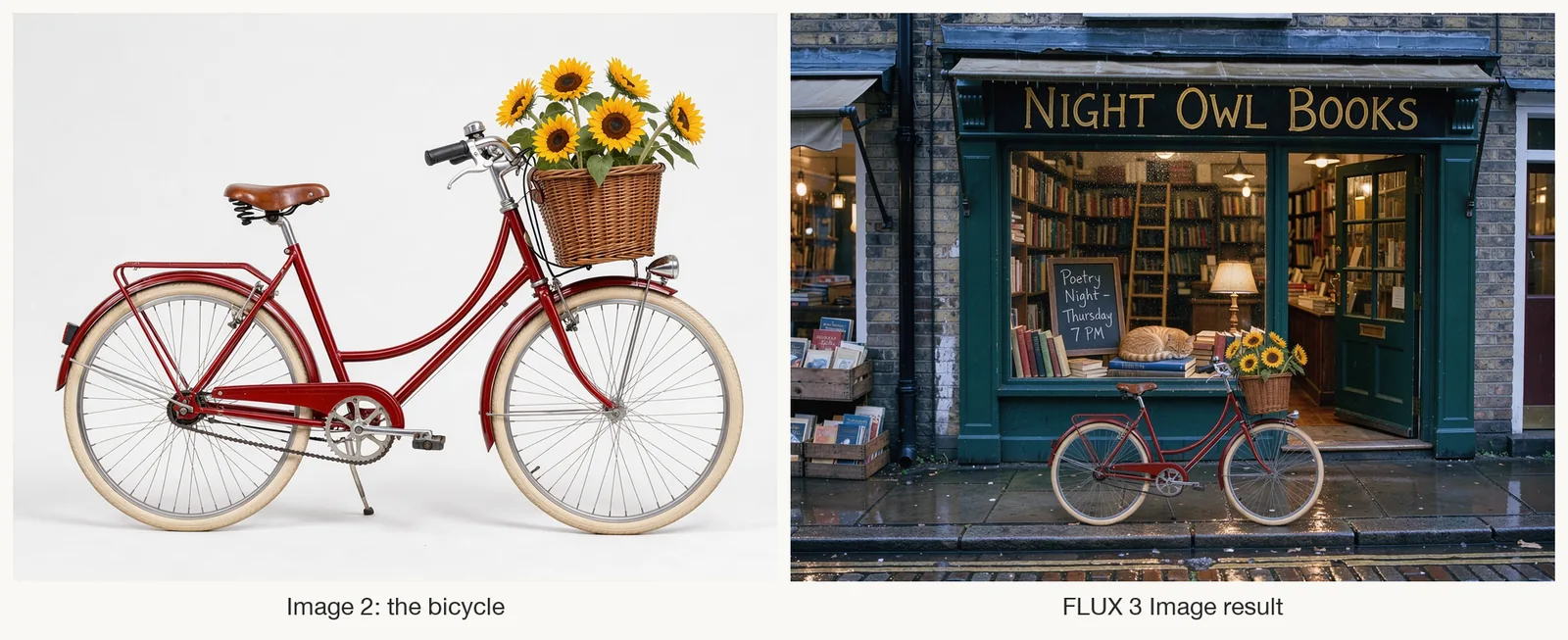
Left: the bicycle reference, image 2. Right: the edit combining it with the FLUX 3 bookshop, image 1, from the hero grid.
The red bike and sunflower basket appear in front of the window, left of the door. The shop lettering, chalkboard message and sleeping cat remain recognizable. The bike looks undersized beside the doorway, and the basket and flower arrangement differ from the reference. For a one-photo edit, you can also use our AI photo editor or image to image tools with their available models.
How to try FLUX 3 Image
You have three practical routes:
- Black Forest Labs directly. The BFL Playground runs it in the browser, and the API endpoint is
flux-3-image. Only a prompt is required; references, aspect ratio, resolution and grounding are optional. You'll need a BFL account and credits. - An API platform. Platforms such as fal host FLUX 3 Image with their own request format and billing. This suits developers who already use one of them.
- A web app. A browser interface handles the API request for you. Check which model the app actually offers and whether it accepts reference images.
One option is to try FLUX 3 Image online at flux-3image, an independent web app that runs the model through an API. It isn't affiliated with Black Forest Labs, and you pay with credits.
Whichever route you choose, start with one reference image and a short instruction. Add more references only when each one has a clear job, and say what that job is.
Prompting FLUX 3 Image with references and exact text
- Name each reference by number and give it one job. BFL recommends referring to images by position. In the edit above, image 1 supplied the scene and image 2 supplied the bicycle.
- Say what must stay the same. Naming the sign, the chalkboard and the cat is what kept them intact.
- Describe what you want, not what you don't. BFL recommends positive descriptions over negative prompts.
- Put exact text in quotes. The bookshop prompt did this for both signs. All four outputs included the requested wording, though two added text.
- Check the small details. Review object counts, colors, scale and lighting. Legible text alone doesn't mean the whole image follows the brief.
Frequently asked questions
When was FLUX 3 Image released?
Black Forest Labs released FLUX 3 Image on October 1, 2026. The wider FLUX 3 family was announced on July 23, 2026, and FLUX 3 Action followed on September 23.
Can I download FLUX 3 Image and run it locally?
There is no public open-weights release of FLUX 3 Image as of October 2, 2026. You can access it through the BFL API, Playground or a third-party app. FLUX 3 Action has open weights, but it is a separate action model.
Is FLUX 3 Image free?
It uses credits through BFL and third-party platforms. The independent flux-3image app offers welcome credits for Google sign-ups, but those are a limited allowance. Check the current terms of the service you choose.
Can FLUX 3 Image edit my own photos?
Yes. One model handles both generation and editing. Send your photo as a reference image and describe the change; you can add up to nine more references in the same request.
What is the difference between FLUX 3 and FLUX 3 Image?
FLUX 3 is the name of the whole family, which includes image, video and action models. FLUX 3 Image is the image generation and editing model released on October 1, 2026.
Related guides
- Try the free AI photo generator →
- Compare models in the realistic AI image generator
- Edit a photo with an instruction in the AI photo editor
- Turn one image into a new version with image to image
- Make a poster with readable text
Pick the model by the job
Try FLUX 3 Image for reference-based compositions or layout control, and check the result's small details. To compare the other models available here, start with a free image in AI Photo Generator →.