
AI Political Cartoon Generator: From Idea to Visual Joke
Use an AI political cartoon generator with two real pothole satire examples. Copy the exact prompts, compare the outputs, and see what the revision changed.
To use an AI political cartoon generator, describe a public claim and a scene that contradicts it. In AI Photo Generator, you can turn a written idea into an editorial cartoon without uploading a photo. Here, a fictional mayor celebrates road repairs beside an unfilled pothole; a revised prompt turns that celebration into a ribbon ceremony.
Last updated: October 10, 2026 · 5 min read
1. How do you turn a road-repair argument into a cartoon?
Start with the point you want the reader to understand:
The mayor wants credit for fixing a road that still has a huge pothole.
“Government inefficiency” names a subject. This sentence gives you something to draw: an official claiming success beside unfinished work. The pothole shows the failure, and the celebration exposes the mayor's misplaced pride.
For your own cartoon, decide three things before generating:
- The claim: What is the official celebrating or promising? Here, it is improved roads.
- The contradiction: What visible object undermines that claim? Here, it is an unfilled pothole.
- The action: How can the person interact with that object? Here, the mayor can hold a ceremony across the hole.
Keep the cast small. This example uses an invented mayor aged 50 and, in the revision, one adult resident aged 35. It makes no claim about a real town or politician.
2. What does the starting celebration prompt produce?
Open the AI cartoon generator, sign in, and select GPT Image 2.5, 1K under Quality, and 3:2 under Size. Leave the photo upload empty. Tool-page examples pre-fill an editable prompt box; replace that text with the prompt below.
The live pricing page, checked October 10, 2026, lists 3 credits per 1K image for GPT Image 2.5. Check the displayed cost before each generation, including retries. These examples use that premium model, not the separate free FLUX.2 [klein] model.
Exact starting prompt:
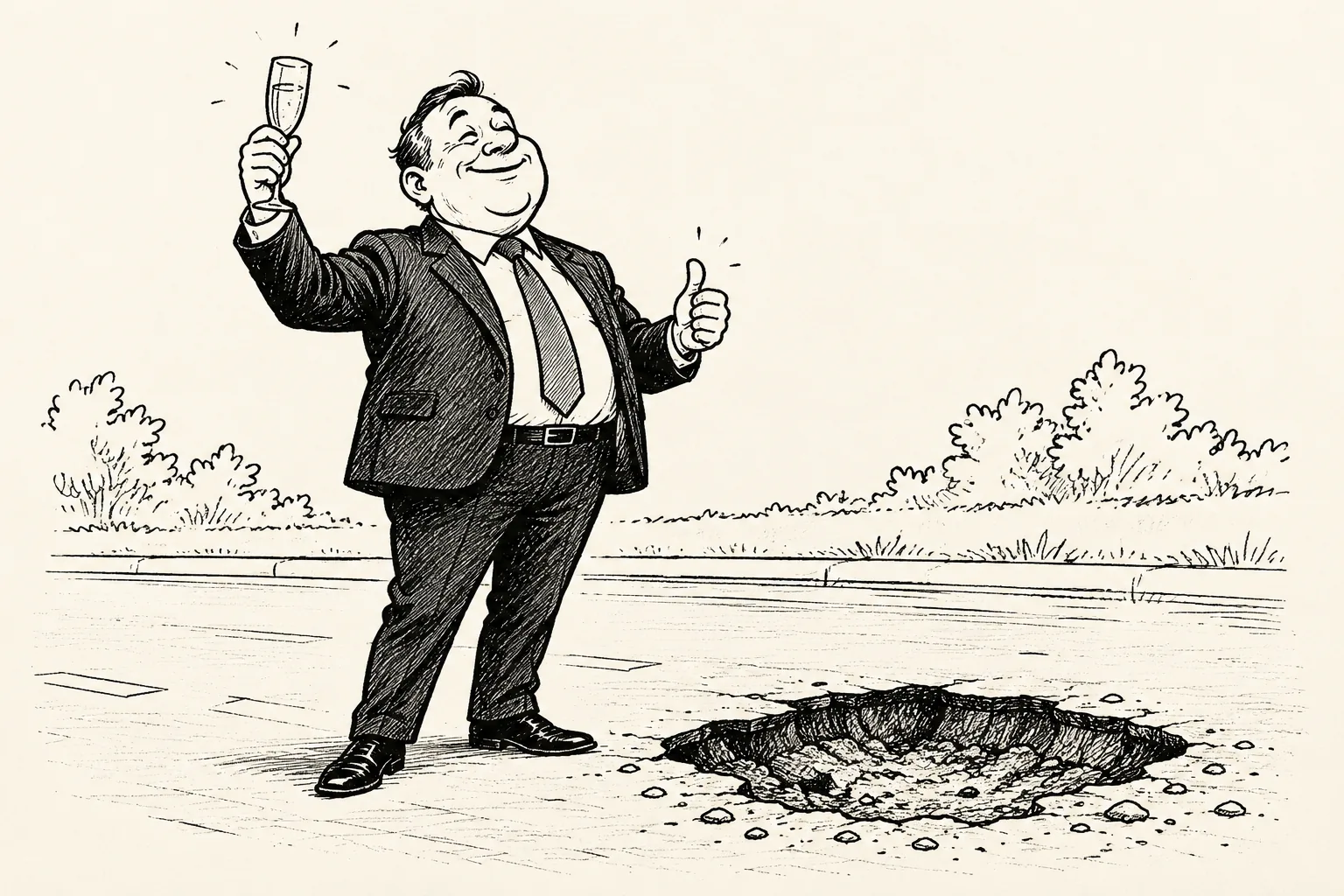
Single-panel editorial cartoon about a fictional adult mayor aged 50 celebrating road improvements beside an unfilled pothole. Black ink on cream paper, simple background, no real people, no logos.
Starting output: GPT Image 2.5, 1K, 3:2; 1536 × 1024 pixels. The model interpreted “celebrating” as a toast and a thumbs-up.
The smiling mayor and the hole already suggest misplaced celebration. But the prompt leaves the ceremony unspecified: the glass and gesture are the model's additions. Nothing physically connects the celebration to the road defect.
3. How does a ribbon ceremony sharpen the joke?
Give the mayor a specific action: cutting a ribbon stretched across the pothole. Add a resident looking at the unfinished work, and use “Progress!” as the mayor's boast.
Exact revised prompt, using the same model and settings with no photo attached:
A fictional adult mayor aged 50 in a navy suit ceremonially cuts a ribbon stretched across a huge unfilled pothole. One adult resident aged 35 in modest everyday clothing looks at the hole. Single-panel black-ink editorial cartoon, strong silhouettes, simple background. The only caption is Progress! No real people or logos.
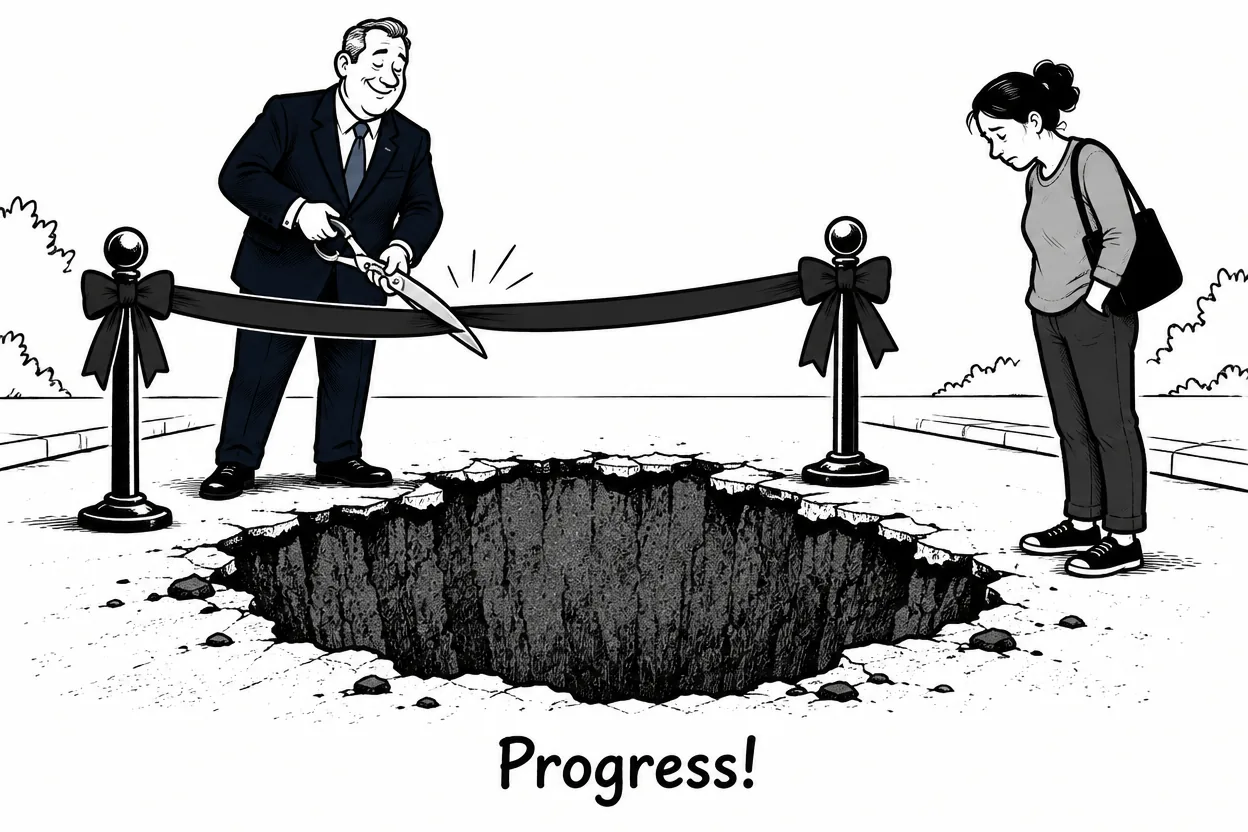
Revised output: GPT Image 2.5, 1K, 3:2; 1248 × 832 pixels. A ribbon ceremony frames the pothole, with “Progress!” beneath it.
The enlarged hole dominates the foreground. Two posts support the ribbon above it, the mayor holds oversized scissors at the ribbon, and the resident looks down. “Progress!” is spelled correctly and is the only lettering.
| Detail | Starting output | Revised output |
|---|---|---|
| Celebration | Raised glass and thumbs-up | Ribbon ceremony with scissors |
| Road defect | Shallow hole beside the mayor | Large, deep hole in the foreground |
| Second viewpoint | No resident | Resident looking down at the hole |
| Caption | None | Progress! |
The mayor's face and build change between these separate generations. The revised drawing also leaves the ribbon continuous, so it shows the ceremony in progress rather than a completed cut.
4. Can the reader get the joke without the caption?
Cover “Progress!” and look at the revised drawing. The ceremony and unfinished road should still be recognizable. Uncover the word: it adds a boast that the picture undercuts.
If your result needs a paragraph of explanation, change the placement or action. For this joke, “a huge pothole in the foreground, directly beneath the ceremonial ribbon” is a useful revision. Adding more political symbols would compete with the road-repair argument.
Check the downloaded image at its intended newsletter or social-post size. Read every letter and inspect the hands, scissors, ribbon, and hole. Keep both the ribbon and pothole visible when cropping.
For a caption correction on an image you otherwise like, the AI photo text editor guide shows how to specify the exact old and new wording. For a simpler drawing treatment, the AI line art generator offers outline-focused prompt examples.
How can you adapt the scene to another civic issue?
Keep the link between a public claim and a visible problem. An official announcing simpler paperwork behind a desk buried in forms is another possible scene. A ceremonial bow around a leaking roof could serve a maintenance dispute. These are ungenerated prompt ideas.
Choose the argument and action before changing the medium. The Seedream illustration prompt gallery includes watercolor and two-color print examples you can consult for style wording. The pothole examples here demonstrate black-ink civic satire with GPT Image 2.5.
Frequently asked questions
Do I need a photo to generate a political cartoon?
No. Both cartoons here were generated from text with the upload area empty. Describe the subject, action, setting, drawing style, and any caption in the prompt.
How do I get a short caption into the cartoon?
Specify the exact wording and ask for it to be the only caption. The revised prompt uses “The only caption is Progress!” The output spells it correctly, but you should read the lettering in every new result.
Were these political cartoons made with the free model?
No. Both used GPT Image 2.5 at 1K and 3:2. AI Photo Generator also offers a separate free FLUX.2 [klein] model, whose political-cartoon output is not shown here.