
How to Tell If an Image Is AI Generated
Learn how to tell if an image is AI generated: trace its source, check credentials and watermarks, and inspect details in two documented AI portraits.

To tell if an image is AI generated, trace its source, check its recorded creation history, and inspect visible inconsistencies. Appearance alone cannot settle the question: images made with AI Photo Generator can have plausible lighting, hair, and fabric detail. When the evidence is incomplete, leave the origin unconfirmed.
Last updated: October 3, 2026 · 6 min read
Where did the image first appear?
Save the page address and caption. Separate two questions: how the image was made, and whether it shows the person, place, or event named in the caption. A camera photo with a false date can mislead you too.
Start with a reverse image search:
- On Google, click Search by image, then upload the file or paste its image URL. Google's Lens instructions show both options.
- Open matching pages. Look for the creator's original post, an agency credit, or a disclosure that the image was generated. Compare the captions and dates.
- If the image claims to show an event, look for another view from an independent source. Several sites repeating the same picture and caption give you no independent confirmation.
Google's About this image can show when Google first saw a similar image and pages that used it earlier. Where available, open an image result, choose About, then Learn more about an image. Availability varies by region.
An early search result is a lead, not necessarily the original upload. Ask who created the picture and how. If you find no match, the origin remains unresolved.
What can Content Credentials tell you?
Get the original downloadable file when possible. Open the Content Credentials verifier, drag the file into it, and read any available history. Look for the app or device, recorded edits, and indications of AI use.
The Content Authenticity Initiative explains that these records are digitally signed to make changes detectable. The information included varies by tool and creator. A supported camera capture followed by a generative edit has a different history from a scene created entirely with AI.
Credentials document origin and editing history; they do not establish that the event happened as described in a caption. If no credentials appear, you still need other evidence. The verifier warns that the technology is still rolling out and some content has no information to display.
Can Google check for an invisible AI watermark?
For another targeted check, sign in to Gemini, select Add files, upload one image, and ask: “Was this image created or edited by Google AI?” Google's verification instructions explain that Gemini checks for SynthID, an invisible watermark associated with Google's AI content. It can also read compatible Content Credentials.
A detected SynthID watermark indicates Google AI involvement in all or part of the image. An absent watermark does not rule out AI from other systems. Google also says extensive alterations can prevent watermark detection. Keep the watermark finding separate from any visual guesses in the response.
Why can a generated portrait look like a camera photo?
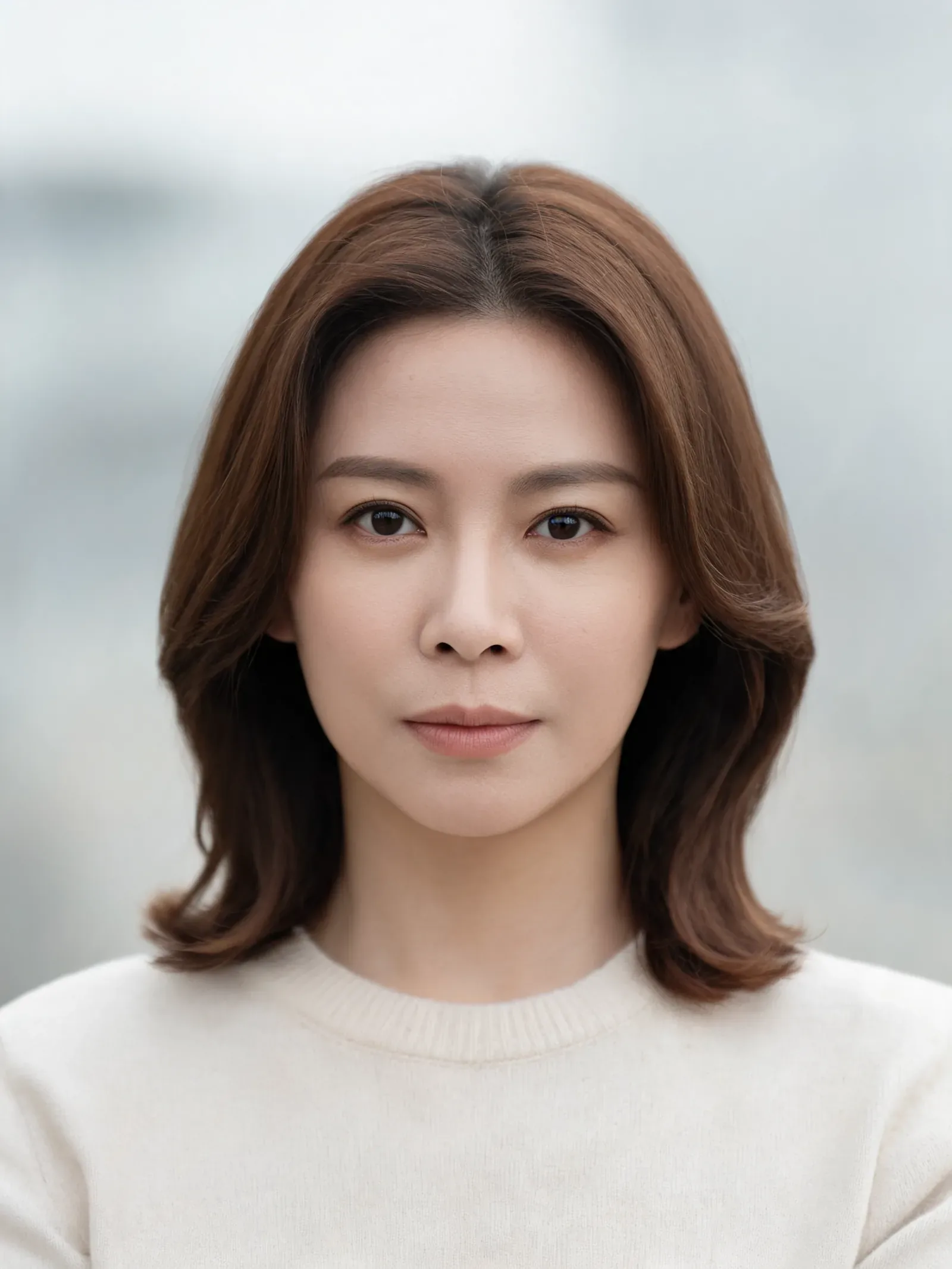
These two images come from our published Nano Banana portrait prompts. The reference is a fictional woman generated with Seedream 5 Lite. The second image is a Nano Banana 2 edit at 1K, 3:4. Both have a documented generated origin; neither is a camera-photo baseline.
| Generated reference | Window-light edit |
|---|---|
 | Nano Banana 2 edit showing the fictional woman beside a bright window on the left |
Left: previously published Seedream 5 Lite reference. Right: previously published Nano Banana 2 edit, 1K, 3:4. Both images are AI generated.
The exact published edit instruction was:
Turn this reference photo into a window-light headshot. Use soft daylight from a large window on the left, a pale neutral indoor background, natural skin texture, and head-and-shoulders framing with the whole head visible. Preserve her facial features, shoulder-length brown hairstyle, neutral expression, and cream crew-neck sweater with the same clothing coverage.
Compare the window, face, and sweater. The output has a bright window on the left and a shaded right side of the face. Individual hair strands and the ribbed sweater collar are visible, and the whole head fits in the frame. These details are consistent with the requested photographic look. They cannot tell you whether a camera was used; the published source supplies that answer.
This pair illustrates one generated portrait and one edit. It has no visible hands or lettering, so it cannot demonstrate errors in those areas or measure how accurately people spot AI images.
The realistic AI image generator lets you describe light, texture, and framing in a prompt. Tool pages offer editable examples; your submitted prompt goes to the selected model as typed. The AI photo editor works from an uploaded image and a written instruction. An edited reference may already be AI generated, as it is here.
Which visual details deserve a closer look?
View the largest available version at normal size, then zoom into specific areas. Describe a visible inconsistency precisely. “The finger merges into the cup handle” gives you something to investigate; “the skin looks too good” gives you little to check.
| Area | What to inspect |
|---|---|
| Hands and contact points | Finger structure, grip, objects passing through skin |
| Lettering | Malformed letters, words that change across repeated signs |
| Light and reflections | Shadow direction, reflected objects, contact shadows |
| Faces and repeated objects | Distorted teeth or jewelry, shapes that merge unexpectedly |
These are possible generation or editing errors, not conclusive labels. Compare the questionable area with the original file and other views of the subject. Smooth skin, soft focus, or an unusual expression alone cannot establish AI use. The clean-looking portrait above also shows why finding no obvious error cannot establish a camera origin.
How should you interpret an AI detector score?
A detector score is another clue. The Content Authenticity Initiative warns that detection results can be unreliable. The research paper Robustness of AI-Image Detectors examines attacks and reliability limits affecting both watermark-based and classifier-based detection. It does not supply an accuracy rating for every current tool.
If you use a detector, save its name, result, and the file you submitted. Read what its percentage means before quoting it. A file-classification score cannot verify the date, location, or identity in a caption. No classifier scores are reported for the portraits here.
Match your conclusion to the evidence:
- Generated: the creator's documented source identifies the image as generated, as with these portraits.
- AI edited: a source or recorded history identifies an AI edit. Describe the edit without assuming the entire scene was invented.
- Unconfirmed: you have only suspicious details, a detector score, or conflicting findings. State what prompted the question and what evidence is missing.
Frequently asked questions
Can Google detect AI images?
Google offers several checks. Lens finds matching or similar images, About this image provides context, and Gemini can check for Google's SynthID watermark and compatible Content Credentials. None of these provides a universal yes-or-no test for every image generator.
Does missing metadata mean a photo is real?
No. A file without creation history leaves its origin unresolved. Look for the creator's source and other evidence before deciding how it was made.
Are strange hands enough to identify an AI image?
A malformed hand is a reason to investigate. Describe the error and compare the original file with other views. A single suspicious detail cannot reliably identify how the entire image was created.
What if the checks disagree?
Keep the origin unconfirmed. Record each finding separately: what the source says, what the file history records, and what a detector reports. Ask the creator for the original file or an explanation of how it was made.