
Nano Banana Prompts: 6 Portrait Ideas, 2 Real Edits
Copy six Nano Banana portrait prompts, compare two real edits with their reference photo, and see which lighting, background, and crop details to change.
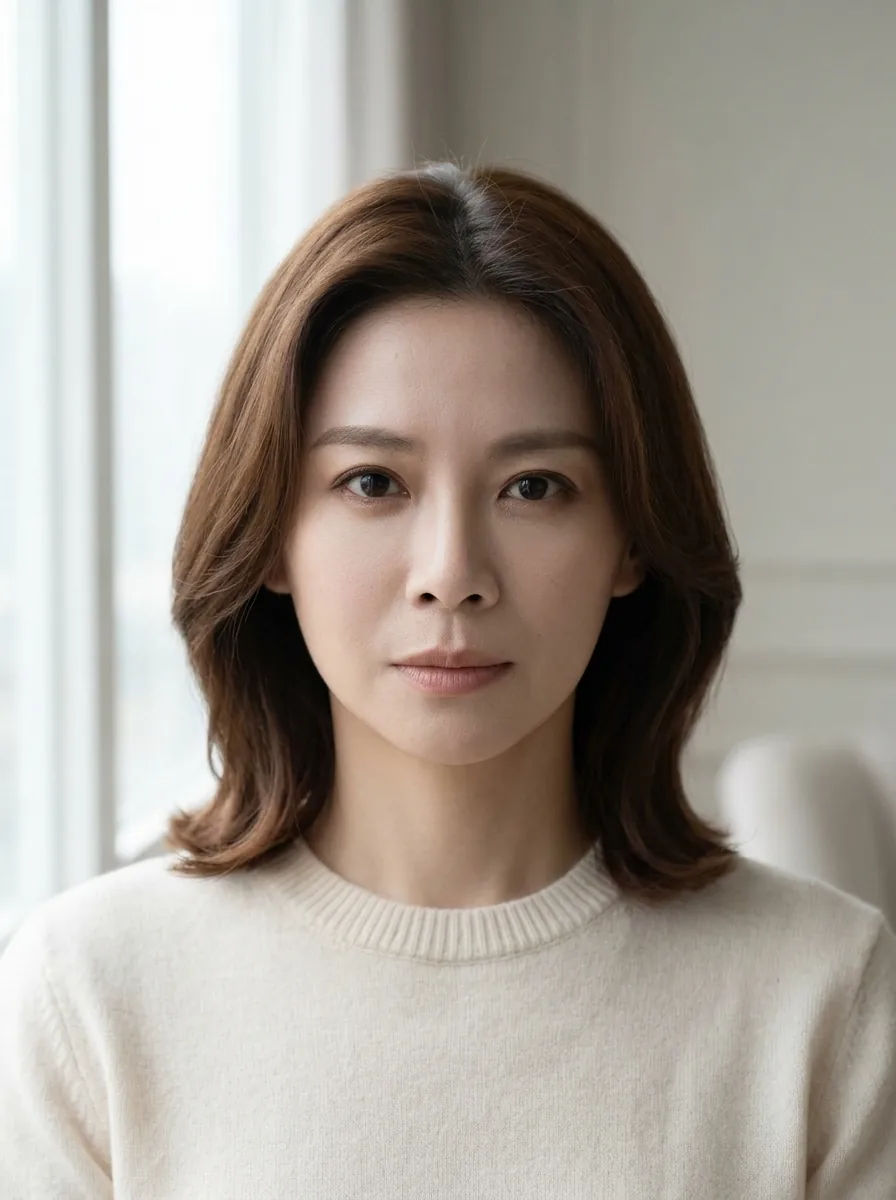
Write Nano Banana prompts by naming the change, setting, light, crop, and details to preserve. For the portrait recipes below, upload a reference to AI Photo Generator and select Nano Banana 2. Six prompts follow: window-light and rainy-city edits with real outputs, plus four untested style ideas.
Last updated: October 2, 2026 · 6 min read
How do you write a Nano Banana prompt for your own photo?
Use this structure: change + setting + lighting + framing + details to preserve. Google's Nano Banana prompting guide recommends concrete scene descriptions and explicit instructions about what an edit should keep.
“A cinematic portrait” leaves the setting and light open. The rainy-city prompt below specifies a sidewalk beneath an awning, rain behind the subject, cool ambient light, and a warm glow on her face. Each detail gives you something to compare with the output.
- Upload a clear PNG, JPEG, or WebP photo, up to 8 MB, with the face fully visible. Sign in to use Nano Banana 2, then choose 1K and 3:4 to match the pictured edits.
- Paste a complete prompt below. Change the hair, expression, and clothing descriptions to match your photo. Keep the lighting and background instructions for the look you want.
- Compare the result with your reference. Check the eyes, nose, mouth, hairline, neckline, and crop before saving it.
Tool pages offer editable example prompts. Your submitted text goes to the selected model. Start each separate look from your original photo so you can compare the changes against the same reference.
What do window-light and rainy-city prompts produce?
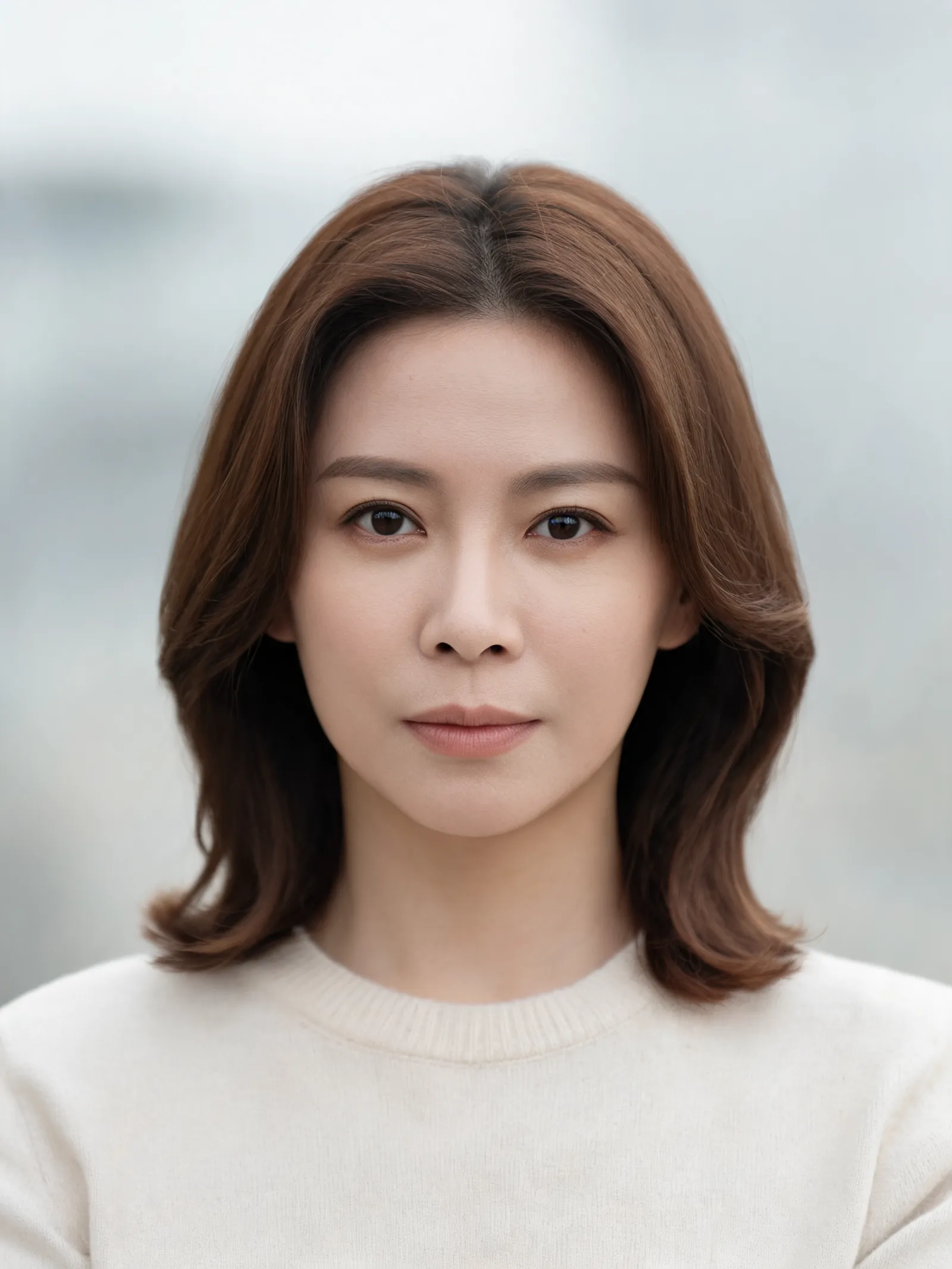
Both edits use one AI-generated reference: a fictional woman with shoulder-length brown hair and a cream crew-neck sweater. Each output came from a single Nano Banana 2 generation at 1K, 3:4.
| Original reference | Window-light headshot | Rainy-city portrait |
|---|---|---|
 | Nano Banana 2 portrait beside a bright window on the left, with brown hair and a cream sweater | 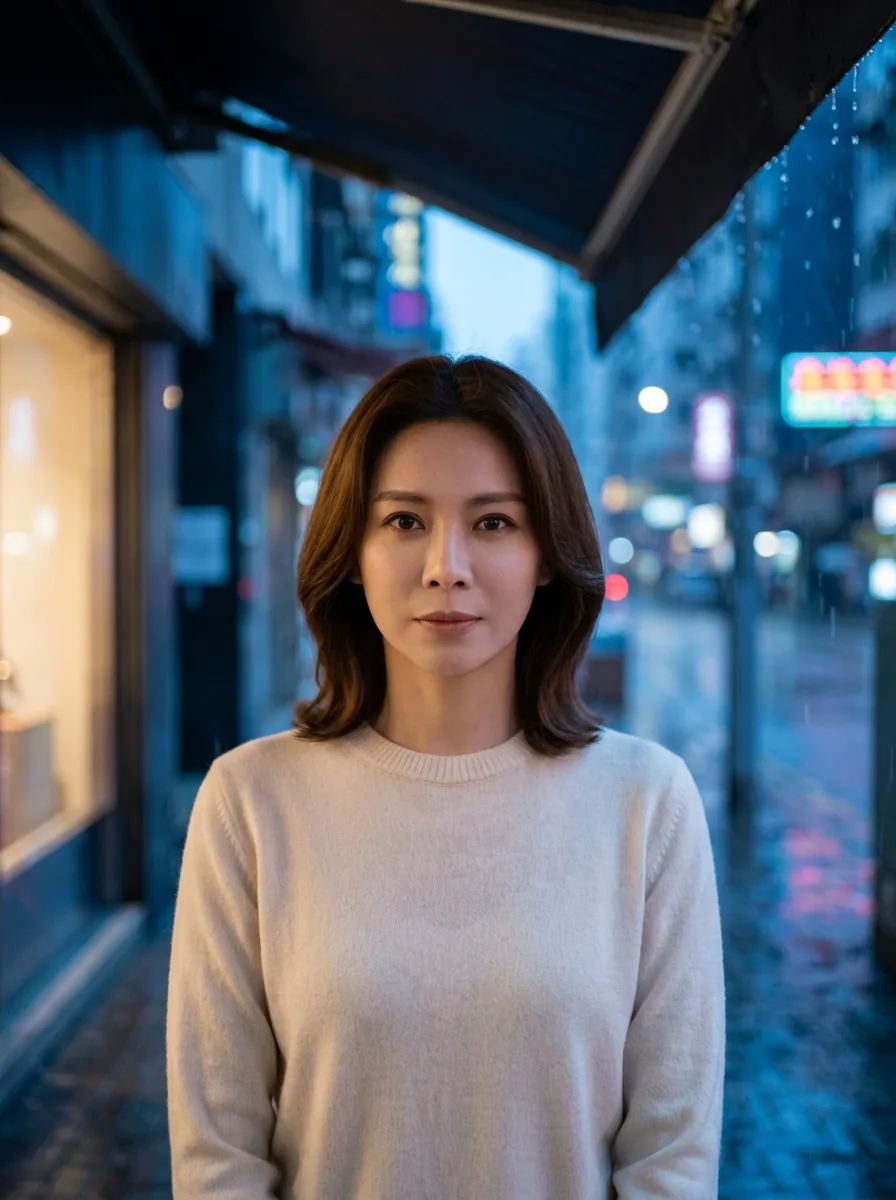 |
Left: fictional reference generated with Seedream 5 Lite. Center: window-light edit, Nano Banana 2, 1K, 3:4. Right: rainy-city edit, Nano Banana 2, 1K, 3:4. Exact instructions are below.
1. Window-light headshot
Turn this reference photo into a window-light headshot. Use soft daylight from a large window on the left, a pale neutral indoor background, natural skin texture, and head-and-shoulders framing with the whole head visible. Preserve her facial features, shoulder-length brown hairstyle, neutral expression, and cream crew-neck sweater with the same clothing coverage.
The bright window appears on the left, with a soft shadow on the right side of her face. A muted gray wall replaces the original pale backdrop. Her brown hair, neutral expression, and cream sweater remain recognizable, and her whole head is visible.
To change this look, edit “large window on the left” for the light direction and “pale neutral indoor background” for the setting. Leave the preservation sentence tied to the person in your photo.
The AI headshot generator offers starting prompts for profile photos. Paste the instruction above and select Nano Banana 2 to use the model shown here.
2. Rainy-city portrait
Turn this reference photo into a rainy-city portrait at blue hour. Place her on a city sidewalk beneath an awning, with rain in the background, softly blurred street lights, and cool ambient light with a gentle warm glow on her face. Keep head-and-shoulders framing with the whole head visible. Preserve her facial features, shoulder-length brown hairstyle, neutral expression, and cream crew-neck sweater with the same clothing coverage.
The output includes the awning overhead, falling rain, wet pavement, and blurred street lights. A warm storefront on the left contrasts with the cool blue street. The face has a warm cast on the left, while the hair and cream sweater remain recognizable.
Both edits show more torso than the reference; the rainy-city image extends roughly to the waist despite the head-and-shoulders instruction. For a tighter profile photo, try “tight head-and-shoulders crop, ending just below the collarbone”; that revision is untested.
The setting and lighting are separate parts of the prompt. To request a daytime version, replace “at blue hour” with “on an overcast afternoon” and remove the warm-glow instruction. That variation has no output here.
Which Nano Banana prompts can you try for four more portrait looks?
These four recipes are untested suggestions. They have no outputs in this gallery. Adapt the hair and clothing details to your reference before generating.
3. Black-and-white film portrait
Turn this reference photo into a black-and-white film portrait. Use soft side lighting, fine film grain, gentle contrast, and a plain dark gray background. Keep head-and-shoulders framing with the whole head visible. Preserve her facial features, shoulder-length brown hairstyle, neutral expression, and cream crew-neck sweater with the same clothing coverage.
This asks for monochrome color, fine grain, and a dark background. When reviewing your output, look for visible hair and sweater detail in the shadows.
4. Watercolor portrait
Recreate this reference photo as a watercolor portrait on off-white paper. Use transparent washes, soft brown hair, warm skin tones, and visible paper texture, with a simple pale blue background. Keep head-and-shoulders framing with the whole head visible. Preserve her facial features, shoulder-length hairstyle, neutral expression, and cream crew-neck sweater with the same clothing coverage.
“Transparent washes” describes the paint; “visible paper texture” describes the surface. The photo-to-art tool offers an upload-based starting point. Paste this recipe and choose Nano Banana 2.
5. Clay figurine
Recreate the woman in this reference photo as a handcrafted clay figurine portrait. Use matte clay, subtle finger-shaped surface texture, shoulder-length brown sculpted hair, a cream crew-neck sweater, and a pale peach studio background. Keep head-and-shoulders framing with the whole head visible. Preserve her recognizable facial features, hairstyle, neutral expression, and clothing coverage.
The material instructions ask for matte clay, sculpted hair, and handmade surface marks. Compare the facial shape and hairstyle with the reference as you judge the stylization.
6. Warm cafe portrait
Turn this reference photo into a warm cafe portrait. Place her beside a cafe window with amber pendant lights and softly blurred wooden tables in the background. Use warm afternoon light and natural skin texture. Keep head-and-shoulders framing with the whole head visible. Preserve her facial features, shoulder-length brown hairstyle, neutral expression, and cream crew-neck sweater with the same clothing coverage.
The window, pendant lights, and tables specify what “warm cafe” should mean in the picture. To request a library version, replace the cafe setting with a reading room and the tables with bookshelves.
How much do these Nano Banana 2 edits cost?
The pricing page lists Nano Banana 2 at 4 credits for 1K, 5 credits for 2K, and 8 credits for 4K, checked October 2, 2026. Both pictured edits used 1K. The separate free model is FLUX.2 [klein]; it did not produce these outputs.
For prompts built around signs and objects, see the bookshop image-model comparison.
Frequently asked questions
Do I need to upload a photo for these prompts?
Yes. All six prompts describe edits to a reference photo. Upload your photo and adjust the hair, expression, and clothing details to match. To generate a new person from text alone, replace the reference-photo wording with a description of that person.
Will the prompt keep my face exactly the same?
Do not assume an exact match. Compare the eyes, nose, mouth, jawline, and hairline with your original before using the result. These two examples use one fictional face; they do not show how the prompts behave on other people.
Were all six portrait looks generated?
Only the window-light and rainy-city prompts have outputs here. The black-and-white, watercolor, clay, and cafe recipes are untested suggestions.