
Nano Banana 2.1 Multiple Images: Combine Up to 10 References
Combine multiple images with Nano Banana 2.1. Compare one, three, and six references for a person, mug, and café, and copy the exact prompt.
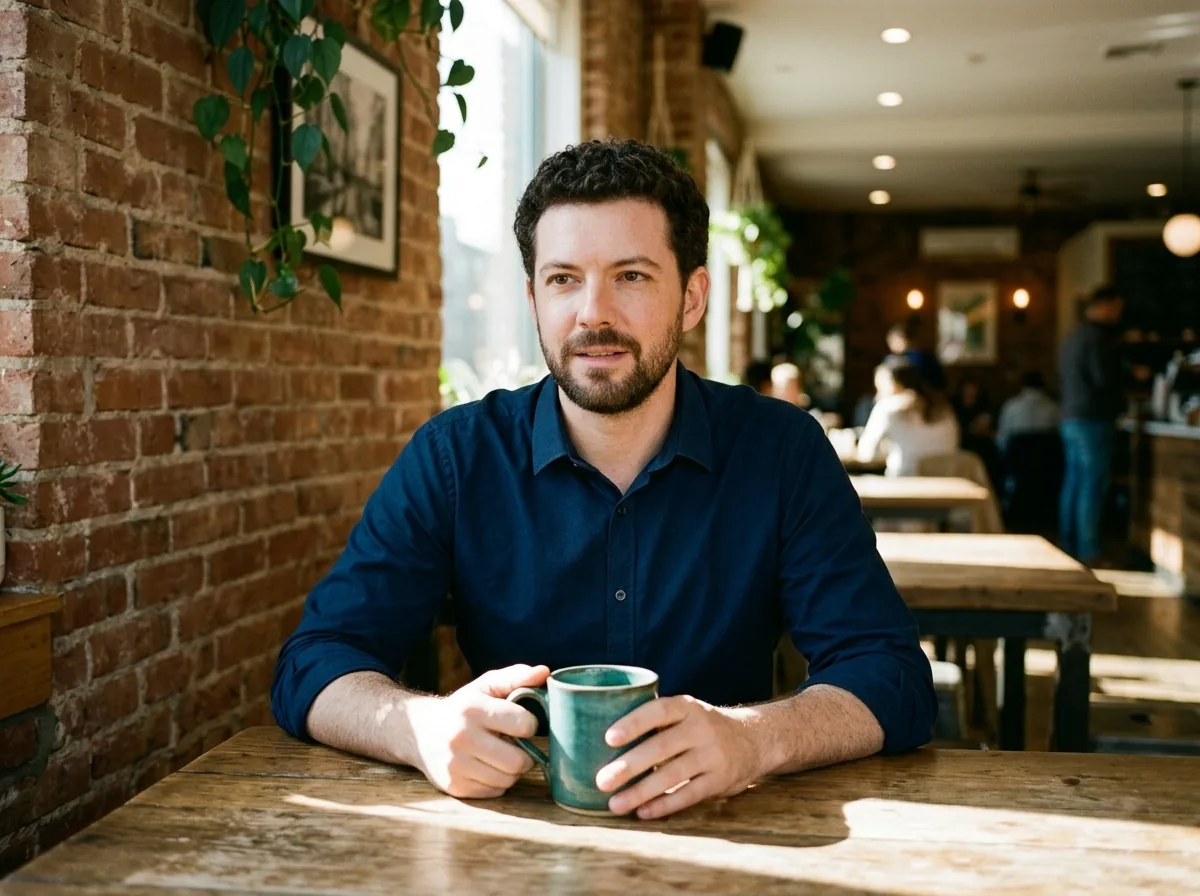
Nano Banana 2.1 combines multiple reference images into one finished picture. In AI Photo Generator, choose Nano Banana 2.1 and assign each upload a role: person, product, or setting. As of October 12, 2026, the site accepts up to 10 reference photos. Here, three captured the main details; six changed the framing without a clear improvement.
Last updated: October 12, 2026
Which photos should you supply for a person holding a product?
Start with one image for each thing you want the model to recognize. For this café scene, we supplied a fictional man's portrait, an unbranded teal mug, and an empty brick café. A portrait alone leaves the model to invent the mug and room from your words.
Google's Nano Banana 2.1 documentation describes combining reference images through multi-image fusion. The 10-photo upload limit here belongs to AI Photo Generator; Google's API documentation lists up to 14 reference images.
We prepared six inputs: those three subjects, followed by an alternate view of each. The sheet shows their upload order, read left to right across the top row, then the bottom row:
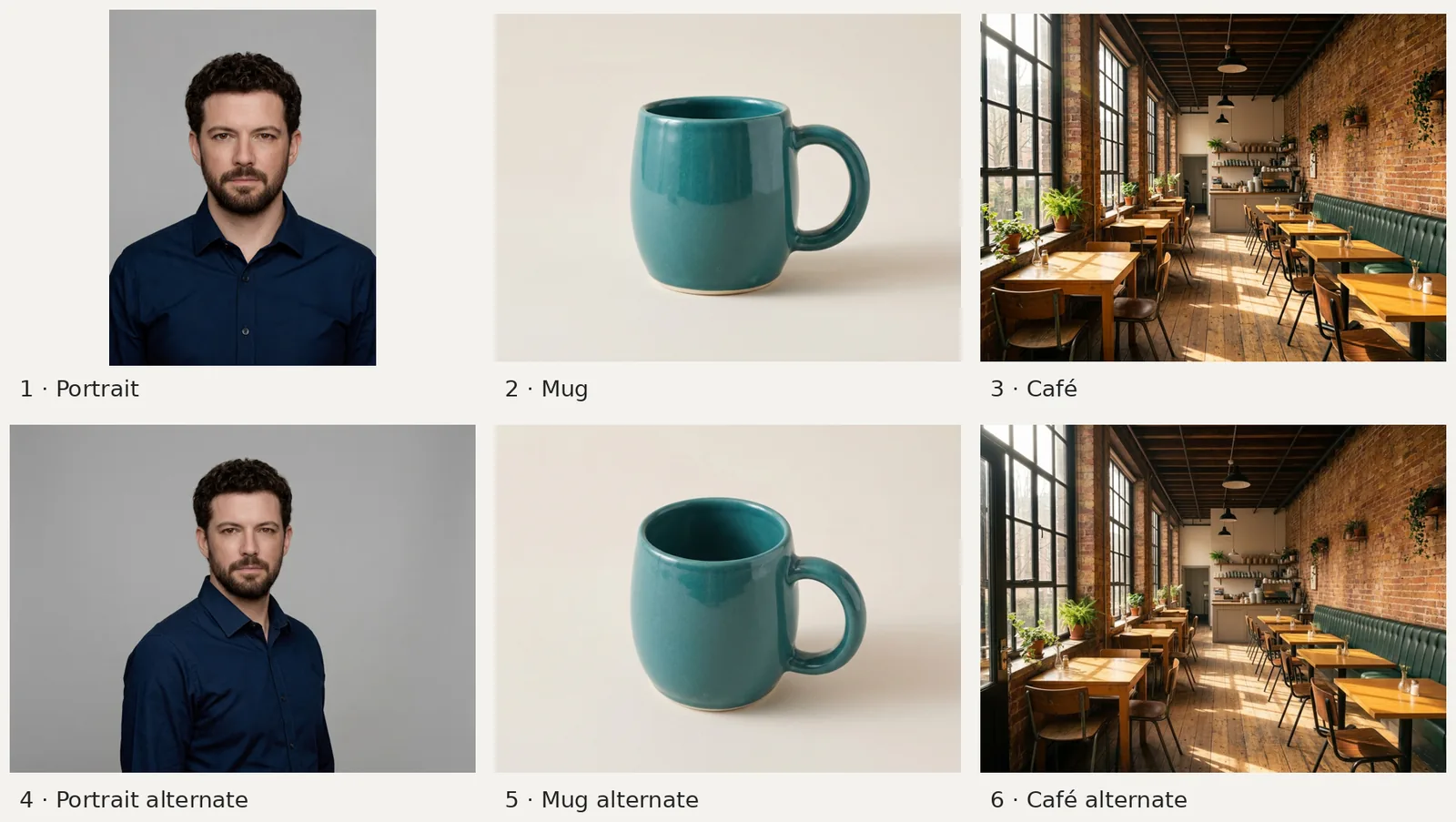
Inputs 1–3: portrait, mug, café. Inputs 4–6: alternate views of each. All are AI-generated. The first portrait is a fictional source image; the other five were made with Nano Banana 2.1, 1K, 4:3. We uploaded the six separate files, not this sheet.
The portrait supplies curly dark hair, a short beard, and a navy shirt. The mug supplies a rounded body, thick curved handle, glossy teal glaze, and narrow cream foot. The café supplies tall black-framed windows on the left, wood tables, exposed brick, and a green bench on the right.
The alternate portrait shows more of the shirt and turns the body slightly. The alternate mug reveals more of its opening. The second café view is very similar to the first, so it adds little new information about the room.
For product prompt ideas, the AI product photo generator offers an editable starting prompt. Supply a photo where the whole object is visible so you can compare its shape with the result.
How do you tell Nano Banana 2.1 what to take from each image?
Name the scene first, then assign the references specific jobs. We used this exact instruction for all three outputs:
Create a realistic lifestyle photo of the fictional adult holding an unbranded teal ceramic mug in a sunlit brick café. Use supplied portrait references only for identity and the navy shirt, product references only for mug shape and teal glaze, and setting references only for the café interior. When a role has no reference, follow this written description. No text or logos.
“Portrait references only for identity and the navy shirt” tells the model which details to borrow from the portrait. It also leaves the gray backdrop out of the requested scene. The product and setting clauses do the same for the mug and room.
For your own three-image request, you can make the assignment explicit: “Use image 1 for the person and shirt, image 2 for the mug, and image 3 for the café.” If you add alternate views, name their roles too.
The sentence about missing roles lets our instruction work with the portrait alone. We supplied file 1 for the one-reference version, files 1–3 for three references, and files 1–6 for six. Each configuration produced one output at Nano Banana 2.1, 1K, 4:3. Ordinary variation between generations can affect the differences, so these pictures do not establish an ideal reference count.
What changes between one, three, and six references?
One reference: the model invents the mug and café
Nano Banana 2.1, 1K, 4:3. Input: portrait only, file 1. Instruction quoted above.
The man resembles the portrait, with curly hair, a short beard, and a navy shirt. His head is fully visible, but his mouth is slightly open and his gaze is off-camera. The new seated pose includes both hands around the mug.
The brick, sunlight, and wooden tables follow the written description. The hanging plants, framed wall art, and background patrons were invented for this scene. The mug has a pale rim and a handle on the left; no mug reference was supplied.
Three references: the supplied room and mug appear
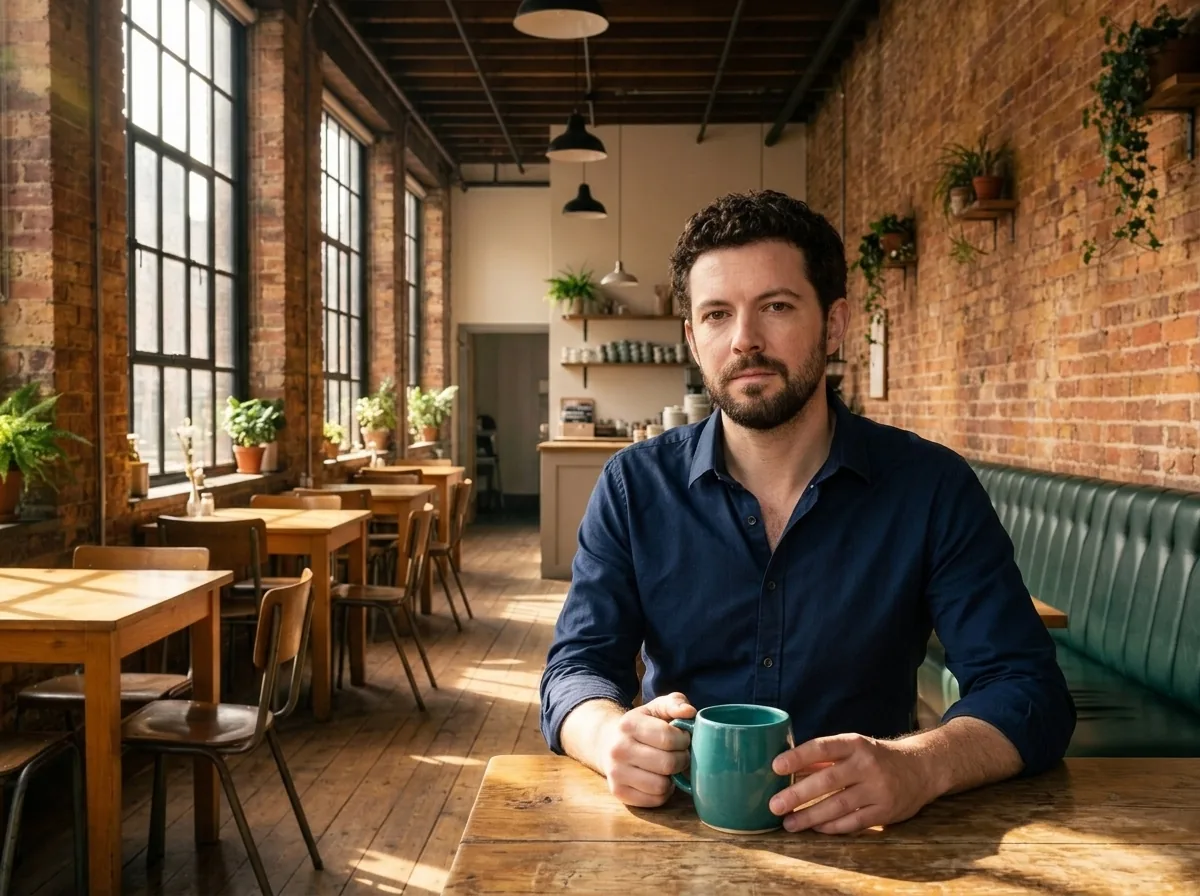
Nano Banana 2.1, 1K, 4:3. Inputs: portrait, mug, café, files 1–3. Same instruction.
The tall windows on the left, green bench on the right, ceiling beams, wood tables, and rear counter make the supplied café recognizable. The man faces the camera with a closed mouth, and the room is empty around him.
The mug now has a teal rim, glossy body, and thin pale base, closer to the product reference. Its handle is on the left for the holding pose, while the source shows it on the right. His fingers cover part of the body and handle, so this view cannot show every product detail.
Six references: another composition with similar details
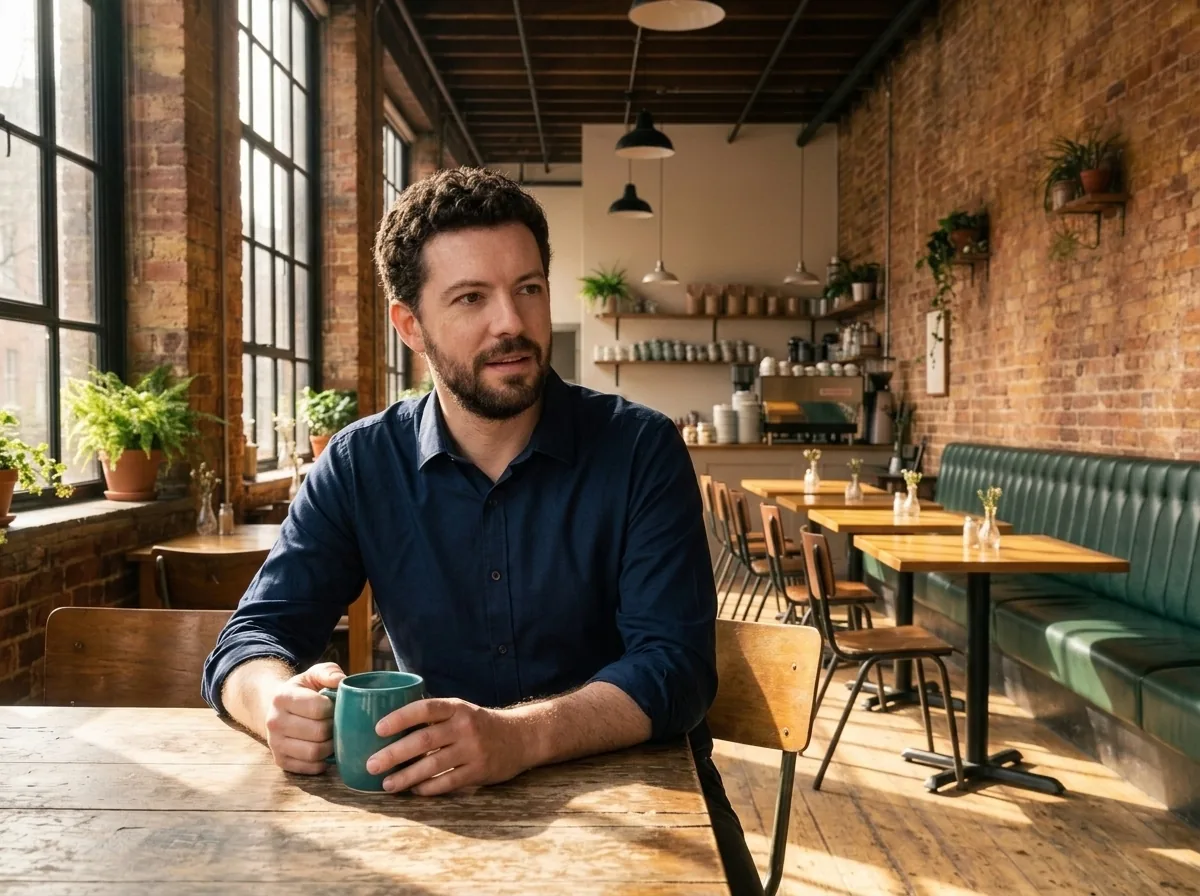
Nano Banana 2.1, 1K, 4:3. Inputs: files 1–6, including the three alternate views. Same instruction.
The man sits farther left, looks to the right, and has a slightly open mouth. More of the green bench and rows of tables fill the right side. The mug still has a teal rim and narrow pale base, with part of it covered by his hands.
The extra views did not produce an obvious gain in mug or room detail over the three-reference output. Both carry the main features of the supplied objects and setting.
| Detail to compare | One reference | Three references | Six references |
|---|---|---|---|
| Person | Resembles the portrait; gaze off-camera | Resembles the portrait; faces camera | Resembles the portrait; gaze right |
| Mug | Invented pale rim | Teal rim and thin pale base | Teal rim and thin pale base |
| Café | Invented room with patrons | Supplied windows, bench, beams, counter | Similar room features; more bench visible |
When is another reference worth adding?
Start with the fewest images that cover the details you need. In this scene, a portrait, mug, and room supplied the main information. The alternate café image largely repeated the first view; the six-reference result offered another framing without clearly improving fidelity.
Add a view when it answers a specific question: what does the opposite side of the mug look like, what clothing falls below the portrait crop, or which part of the room should appear? Compare that detail after generating. If a new reference repeats what is already visible, try refining the composition instruction before adding more files.
All three outputs change the portrait's pose, and two change its expression. References guided the person's appearance without fixing every detail of the original portrait.
For a single change to an existing scene, image-to-image editing provides editable prompt ideas. The Nano Banana glasses-editing example shows instructions for retaining surrounding details while changing one accessory.
How do you upload multiple photos for one result?
- Open the homepage generator and select Nano Banana 2.1 under Model, or use its New chip. The premium model requires an account. Choose it before uploading so the picker allows multiple references.
- Use Add a photo to upload the separate JPG, PNG, or WebP files. Check the thumbnails, then write your scene and each image's role. The site sends your prompt to the model as typed.
- Set Size for the aspect ratio and Quality for the resolution, then generate. As of October 12, 2026, Nano Banana 2.1 offers 1K, 2K, and 4K. These examples used 4:3 and 1K; we did not test ten inputs or 4K. Compare the person, object, and setting with your sources before choosing Download.
Multiple uploads guide a single composition. For separate finished images, make separate generations with the scene or pose you want for each.
Frequently asked questions
How do you add two photos in Nano Banana 2.1?
Select Nano Banana 2.1 before uploading, then add both photos with Add a photo. Describe what to take from each, such as the person from one and the setting from the other.
How many reference photos can you upload?
As of October 12, 2026, AI Photo Generator accepts up to 10 reference photos for Nano Banana 2.1. The pictured examples use one, three, and six; they do not demonstrate the maximum.
Can AI edit multiple photos at once?
In this workflow, multiple photos serve as references for one generated image. To get an individually edited file for each source photo, run a separate generation for each one.