
what makes a good professional headshot: 6 visible traits
Judge a professional headshot by its lighting, crop, expression, and likeness. Compare two real AI edits, then decide whether to keep, retake, or edit.
A good professional headshot shows a clear, recognizable face in even light, with a simple background, a natural expression, and a crop that works as a small profile picture. Wear clothes that fit your work and keep retouching light. If your photo needs a different backdrop or lighting, AI Photo Generator offers an AI headshot generator for requesting those edits. Keep the result only if it still looks like you.
Six visible traits of a useful headshot
Judge the picture at the size someone will see it in a company directory, email profile, or LinkedIn feed.
| Trait | What to look for |
|---|---|
| Clear face | Sharp eyes, visible facial detail, and no glare hiding your eyes |
| Even light | No harsh shadow across your eyes or nose; skin color looks believable |
| Usable crop | Head and shoulders fill the frame, with room above the hair for a circle crop |
| Quiet background | Your face draws attention before the objects behind it |
| Comfortable expression and clothing | A relaxed face and an outfit you would wear to meet a colleague or client |
| Recognizable appearance | Your usual facial features, hair, skin tone, and age survive any edits |
For clothing, start with a solid-color shirt, sweater, or jacket. Check the collar, neckline, and wrinkles before taking the photo. A suit makes sense if you wear one at work; otherwise, choose the level of formality your team uses. Photographer Jay Soriano's headshot guide gives examples of simple clothing and explains why outfit choices depend on the portrait's purpose.
How should you light and frame a headshot?
Use soft light that lets people see both eyes, then crop to your head and shoulders. Leave space around your hair so the destination's circular crop does not cut it off.
Georgia Tech photographer Rob Felt recommends even shade, a plain wall, and framing for the small round or square pictures used online. He also advises keeping both eyes visible and looking toward the lens.
At home, face a bright window without direct sun hitting your face. Put the camera near eye level and ask someone to take the photo from farther away than a close selfie. HeadShots Inc's illustrated phone-photo guide shows how window light and camera position change the result.
Before choosing a picture, preview it in the actual profile crop. If your hair is clipped, loosen the crop. If your face looks tiny, remove some torso and background. Keep the original file so you can make different crops for different sites.
Should you smile in a professional headshot?
Try a relaxed smile, with or without teeth, and choose the version that feels comfortable and suits your work. A forced grin is a reason to take another photo.
Take a few pictures with different expressions rather than holding one smile throughout. HeadShots Inc's guide illustrates full smiles, closed-mouth smiles, and neutral expressions. Compare yours at thumbnail size: look for a relaxed mouth and attentive eyes. The fictional reference below has a neutral expression; it does not demonstrate which smile would suit a real person.
A plain backdrop and an office: two actual edits
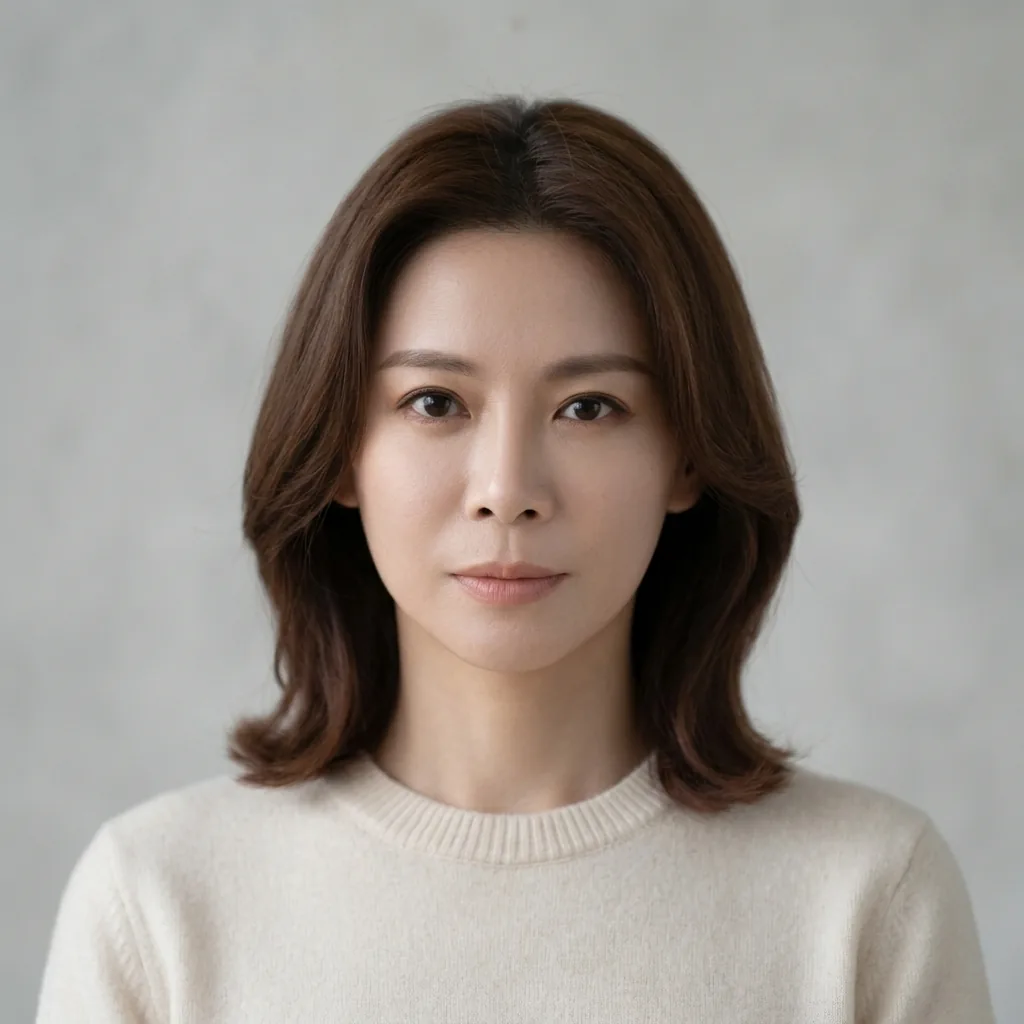
We supplied the same fictional portrait to Nano Banana 2.1 twice, at 1K in a square 1:1 format. Both instructions requested the same lighting, clothing, and facial features; only the background wording differed. These are two illustrative outputs, not a measure of how reliably the model preserves someone's identity.
The complete instruction for the plain-background version was:
Create a head-and-shoulders professional portrait with soft even window light, the whole head visible and room around the shoulders. Preserve her facial features, brown hairstyle, skin tone, expression and cream crew-neck sweater, including natural skin texture. Use a plain light-gray background.Plain-background result. Nano Banana 2.1, 1K, 1:1. The whole head is visible, and the face fills more of the image than in the office result.
The complete instruction for the office version was:
Create a head-and-shoulders professional portrait with soft even window light, the whole head visible and room around the shoulders. Preserve her facial features, brown hairstyle, skin tone, expression and cream crew-neck sweater, including natural skin texture. Use a detailed office background with books, plants and colorful wall art.| Fictional reference portrait | Office-background result |
|---|---|
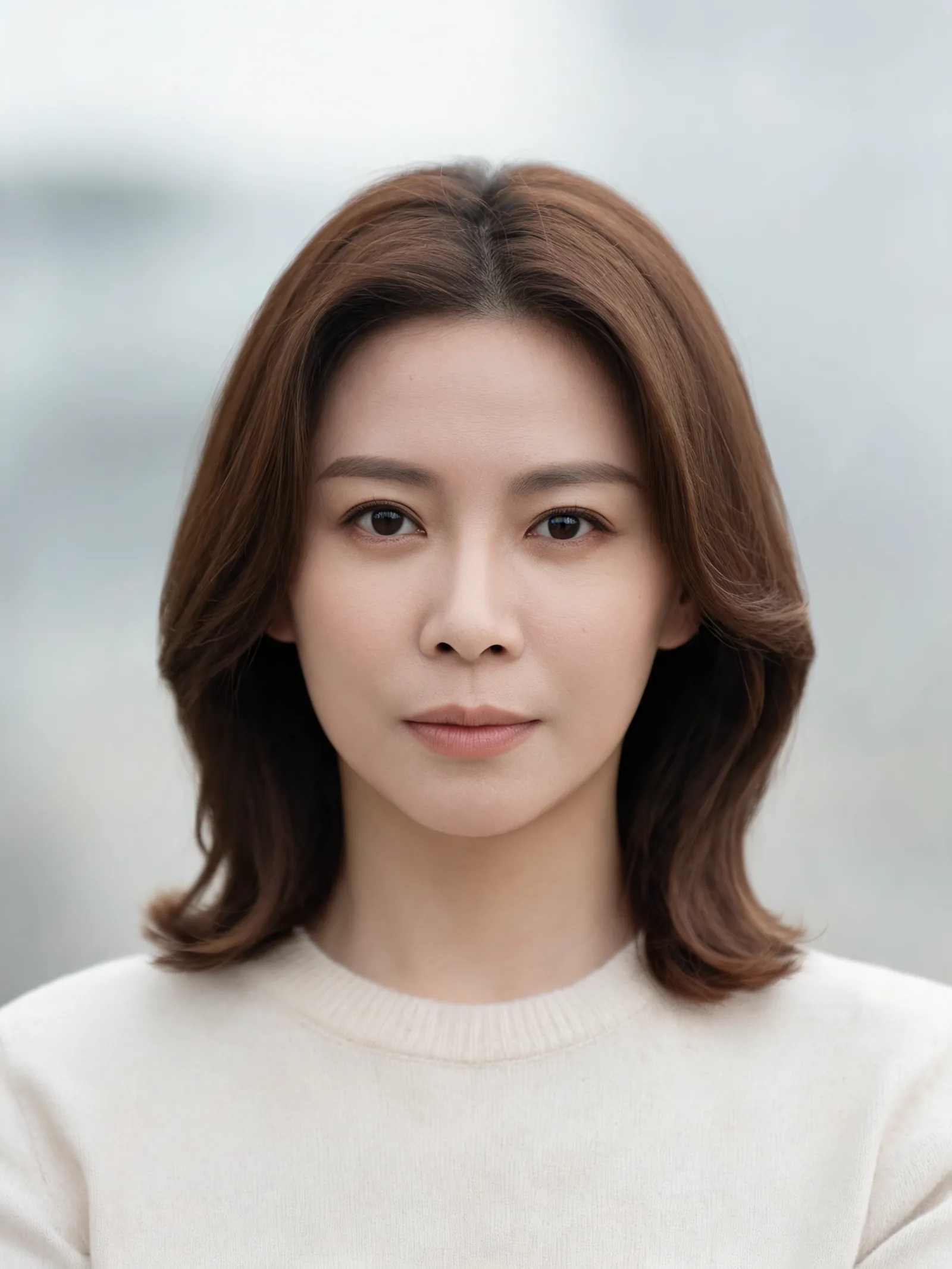 | 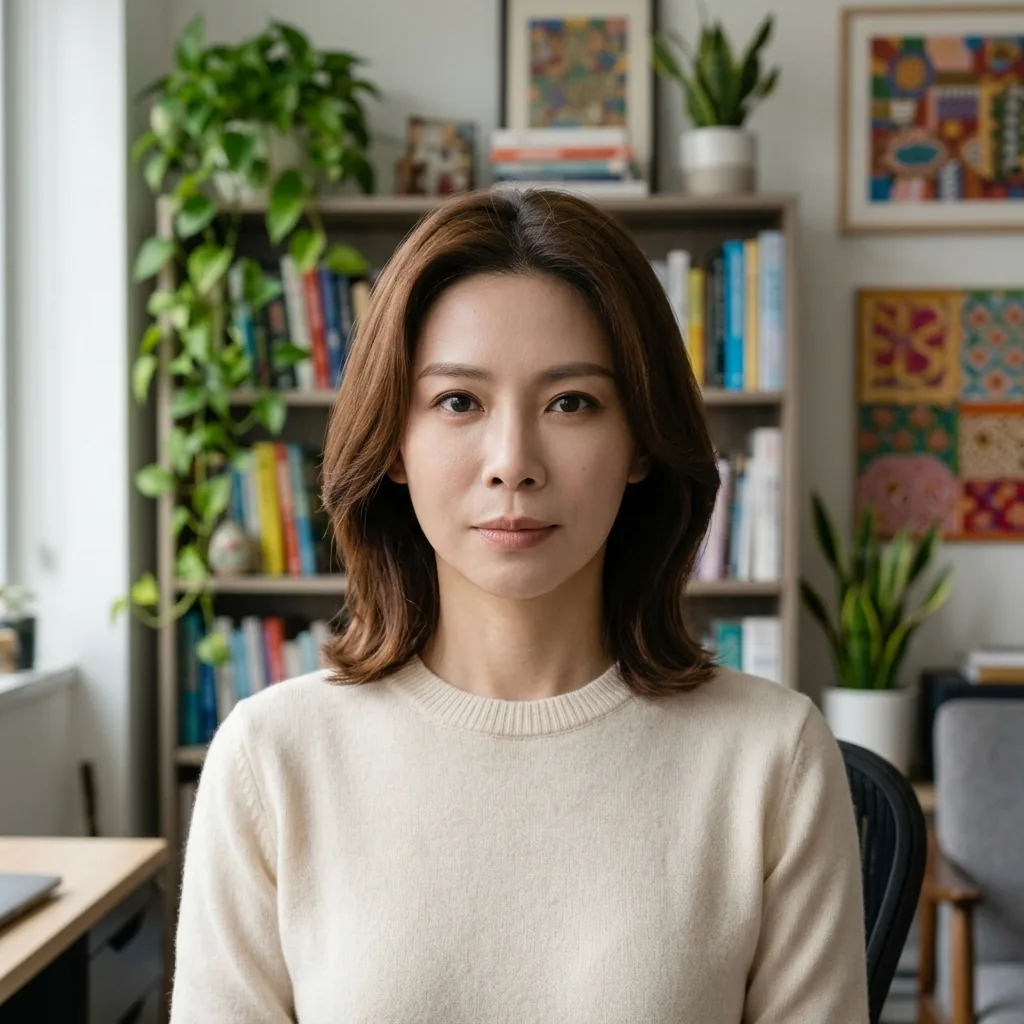 |
Left: the fictional source portrait, reused from our portrait prompt guide. Right: Nano Banana 2.1, 1K, 1:1. The office result includes more torso as well as the requested books, plants, and wall art.
The plain version is the stronger starting point for a small profile picture: its face is larger, and the backdrop has little competing detail. The office version could suit a larger bio portrait where the setting has room to appear. Because the framing also changed, this pair does not isolate the effect of background alone.
Both edits alter details around the eyes and mouth compared with the reference. The shared hair and sweater do not establish an exact likeness; for a real headshot, compare facial features before accepting either result.
Should you keep, retake, or edit your photo?
Keep a photo that already looks like you and works in its intended crop. Retake it if the source is blurry or badly framed. Consider editing when the face is clear but the setting needs attention.
| What you see | Next step |
|---|---|
| Clear face, suitable clothes, and a usable small crop | Keep it; crop a copy for the profile you need |
| A distracting backdrop around an otherwise usable portrait | Try a background edit, then compare the face with the original |
| Blur, a cut-off head, or exaggerated proportions from a close selfie | Retake it in soft light with more camera distance and framing room |
| Changed eyes, mouth, skin tone, hairline, or apparent age after editing | Reject that result; use your original or another photo |
To try the workflow shown here, upload a clear photo, select Nano Banana 2.1, and choose 1K and 1:1. Describe the background and lighting, including what should stay unchanged. Tool-page examples supply editable prompt wording; the model receives the prompt you submit. Premium models require an account and credits. Check the cost shown before generating, or see current plans and model credits.
For a traditional photograph with only minor exposure problems, ordinary brightness adjustments may be enough. Felt's Georgia Tech guidance favors minimal editing; the generated examples here illustrate an optional approach to evaluate carefully.
Frequently asked questions
Can a phone photo be a professional headshot?
Yes. Use soft light, a simple background, and enough camera distance to avoid a distorted close selfie. Check that your eyes are sharp before cropping.
Do you need a suit for a professional headshot?
Choose the formality you use at work. A simple shirt or sweater can suit a casual workplace; a jacket or suit may fit a more formal role.
Is a plain background always best?
A plain background is a dependable choice for a small profile photo. A workplace setting can suit a larger bio portrait if its details remain secondary to your face.
How much retouching is too much?
Reject edits that change your recognizable features, skin tone, hairline, or apparent age. Compare the result with your source photo, including the eyes and mouth.
Can you use an AI-edited headshot for work?
Check your employer's or platform's image rules, then choose a result that accurately represents you. Our two fictional examples show that a preservation instruction can still produce facial changes.
Next step
Check your current photo in its intended profile crop before editing it. For prompt wording, see our Nano Banana portrait examples. For a work-profile variation, the LinkedIn photo generator offers another starting point; apply the same likeness and crop checks to its result.