
AI Christmas Photo Generator: 4 Prompts for Your Photo
Use an AI Christmas photo generator with four copyable prompts. Compare tree, snow, fireplace, and vintage portraits edited from one fictional reference.
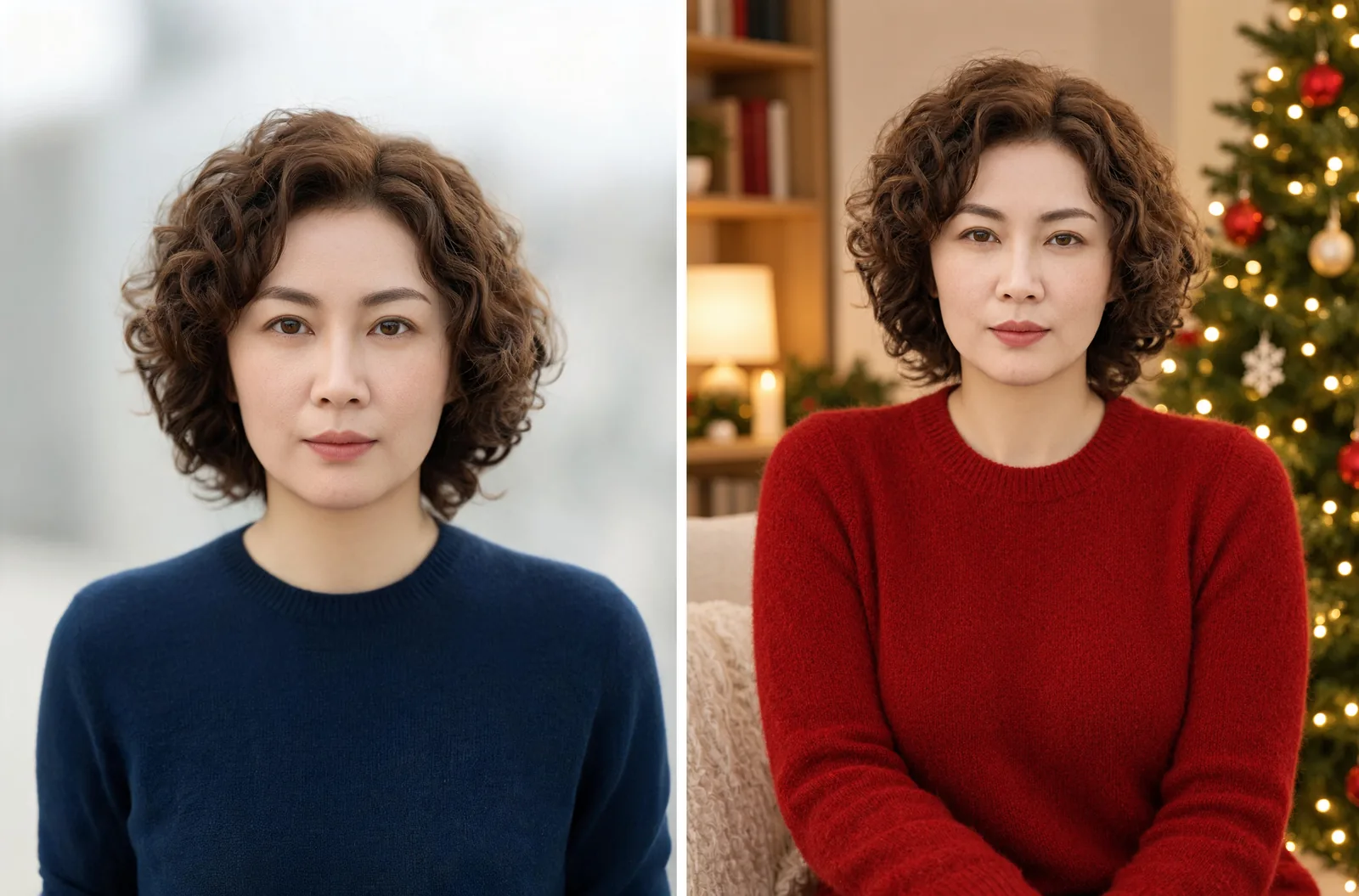
An AI Christmas photo generator can turn an uploaded portrait into a holiday scene with new clothes, lighting, and decorations. In AI Photo Generator, select GPT Image 2.5 and paste one of the four prompts below. Each uses the same fictional reference photo, so you can compare the looks and check what changed.
Last updated: October 7, 2026 · 5 min read
Which Christmas portrait style should you choose?
For a traditional Christmas card, start with the red sweater and decorated tree. Choose snowy evergreens for a winter portrait, the fireplace for a cozy room, or the burgundy studio for a coordinated green-and-red palette.
| Look | Outfit | Setting and light | Best fit |
|---|---|---|---|
| Christmas tree | Red crew-neck sweater | Decorated tree, warm indoor light | A classic Christmas portrait |
| Snowy evergreens | Cream coat and turtleneck | Snow-covered trees, cool daylight | A winter portrait without bright decorations |
| Cabin fireplace | Navy cardigan and ivory top | Fireplace and garland, warm light | A cozy indoor holiday photo |
| Vintage studio | Forest-green sweater | Burgundy backdrop, tree and gifts | A formal holiday portrait |
The AI photoshoot tool opens the same generator with an editable preset prompt. Replace that text with your chosen instruction. Use the original photo for every look so each edit starts from the same face.
How do you turn your photo into a Christmas portrait?
- Upload a clear reference. Choose a sharp JPG, PNG, or WebP with your face unobstructed and room above your hair. The reference upload limit is 8 MB.
- Set the model and image shape. Select GPT Image 2.5, 1K under Quality, and 3:4 under Size to match these examples. Paste one complete prompt below.
- Compare and download. Check the face against your original before saving. Keep the original attached when trying a different scene.
The source in this gallery is an AI-generated fictional portrait, not a customer selfie: a woman described as 37 years old, with short curly brown hair and a navy sweater. All four edits used that same image. Each comparison shows the complete source on the left and the complete output on the right, resized proportionally without cropping.
For your own photo, replace “this fictional 37-year-old adult woman” with “the adult in this reference photo” and change the hair description to match. The AI photo editor offers an upload-first view of the same generator. Tool pages pre-fill the prompt box; your English instruction is sent to the model as typed.
What does the red-sweater Christmas tree prompt produce?
Preserve her recognizable face, short curly brown hair and skin tone. Create a realistic Christmas portrait of this fictional 37-year-old adult woman in a fully covering red crew-neck sweater beside a softly lit Christmas tree with warm white lights and simple ornaments. Use soft warm indoor light and natural skin texture. Frame waist-up with her entire head visible and space above her hair. No text, no logos, no watermark.
Left: AI-generated fictional reference. Right: Christmas tree edit, GPT Image 2.5, 1K, 3:4.
The edit adds a red knit sweater, a Christmas tree on the right, and a lamp and bookshelves on the left. Warm lights and red-and-gold ornaments make this the clearest Christmas scene of the four. The face remains easy to see against the busier room.
“Crew-neck” specifies the sweater's neckline, while “warm white lights” describes the tree's light color. Keep those details when adapting the prompt if you want this look.
What does the snowy-evergreens prompt produce?
Preserve her recognizable face, short curly brown hair and skin tone. Create a realistic Christmas portrait of this fictional 37-year-old adult woman in a fully covering cream wool coat over a cream turtleneck among snowy evergreen trees. Use soft cool winter daylight with a little falling snow and natural skin texture. Frame waist-up with her entire head visible and space above her hair. No text, no logos, no watermark.
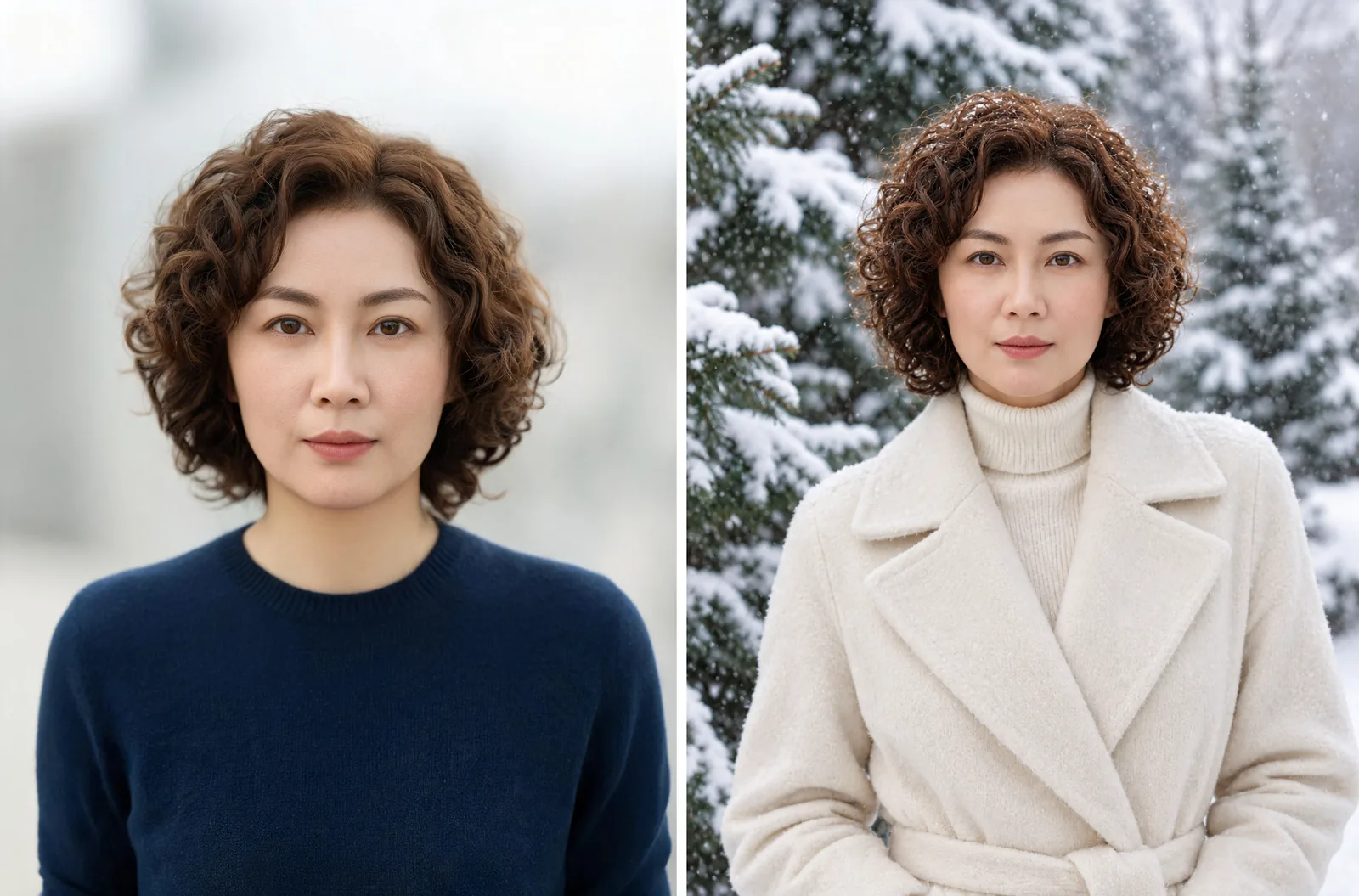
Left: AI-generated fictional reference. Right: Snowy evergreens edit, GPT Image 2.5, 1K, 3:4.
The cream coat and ribbed turtleneck stand out against dark evergreens. Snow appears on the branches and in the woman's curls, with flakes visible in the air. The cooler light gives this portrait a different mood from the indoor versions.
This scene reads as winter more than Christmas: it has no ornaments or gifts. Choose it for a seasonal profile photo, or let the greeting in your card layout establish the holiday.
What does the cabin-fireplace prompt produce?
Preserve her recognizable face, short curly brown hair and skin tone. Create a realistic Christmas portrait of this fictional 37-year-old adult woman in a fully covering navy knit cardigan over an ivory crew-neck top beside a cabin fireplace with a simple evergreen garland on the mantel. Use warm firelight with soft window fill and natural skin texture. Frame waist-up with her entire head visible and space above her hair. No text, no logos, no watermark.
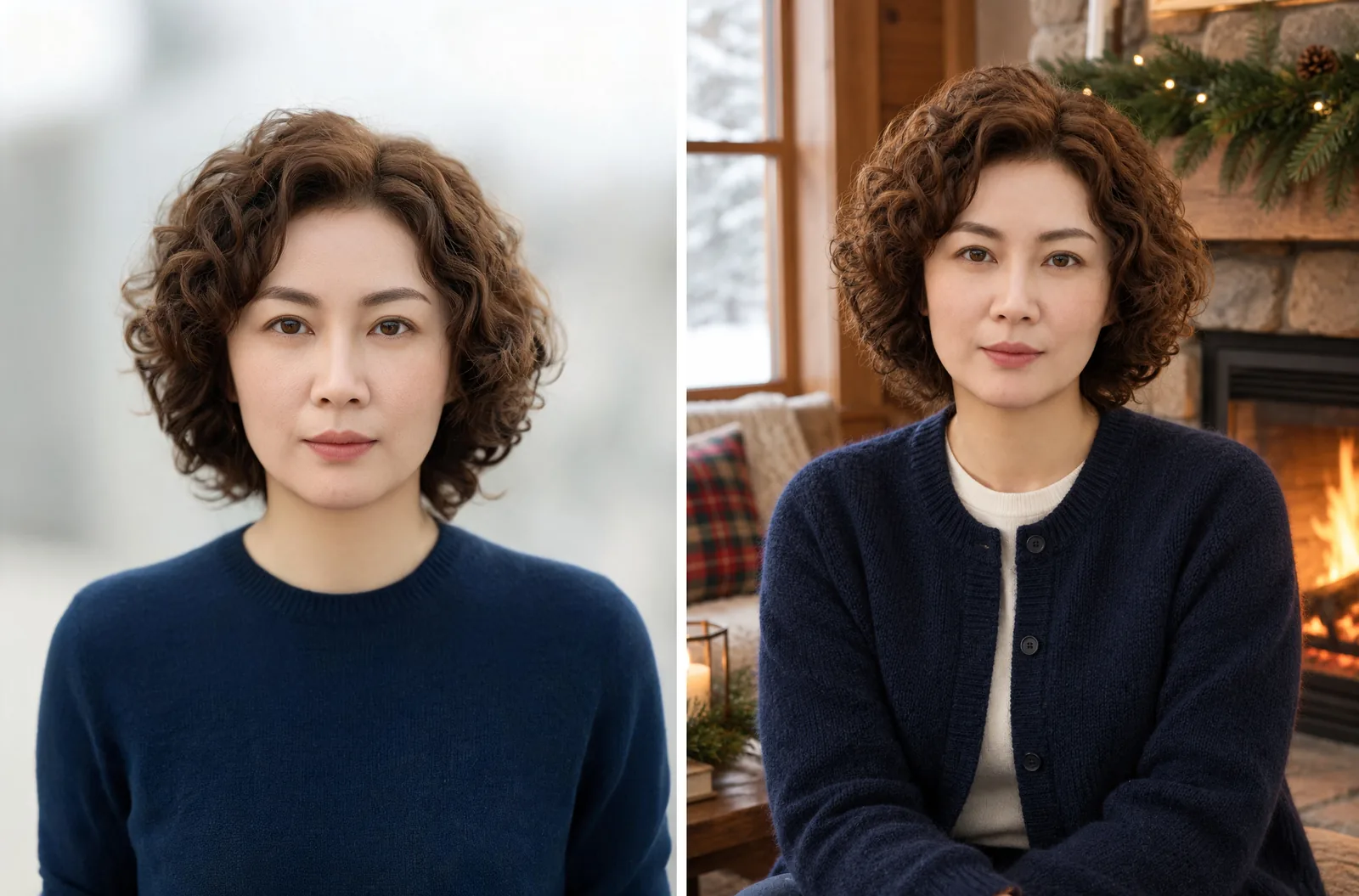
Left: AI-generated fictional reference. Right: Cabin fireplace edit, GPT Image 2.5, 1K, 3:4.
The navy cardigan keeps the source photo's main clothing color while adding buttons and an ivory layer underneath. A window appears on the left, with a lit fireplace and evergreen garland on the right. The face is softly lit even with the orange fire in the background.
This is the least colorful indoor option. Choose it if you like the warmth of a Christmas scene but want the clothing to stay understated.
What does the vintage holiday studio prompt produce?
Preserve her recognizable face, short curly brown hair and skin tone. Create a realistic Christmas portrait of this fictional 37-year-old adult woman in a fully covering forest-green crew-neck sweater in a vintage holiday photo studio, with a muted burgundy backdrop, a small decorated evergreen tree and wrapped gifts. Use soft studio light, gentle film grain and natural skin texture. Frame waist-up with her entire head visible and space above her hair. No text, no logos, no watermark.
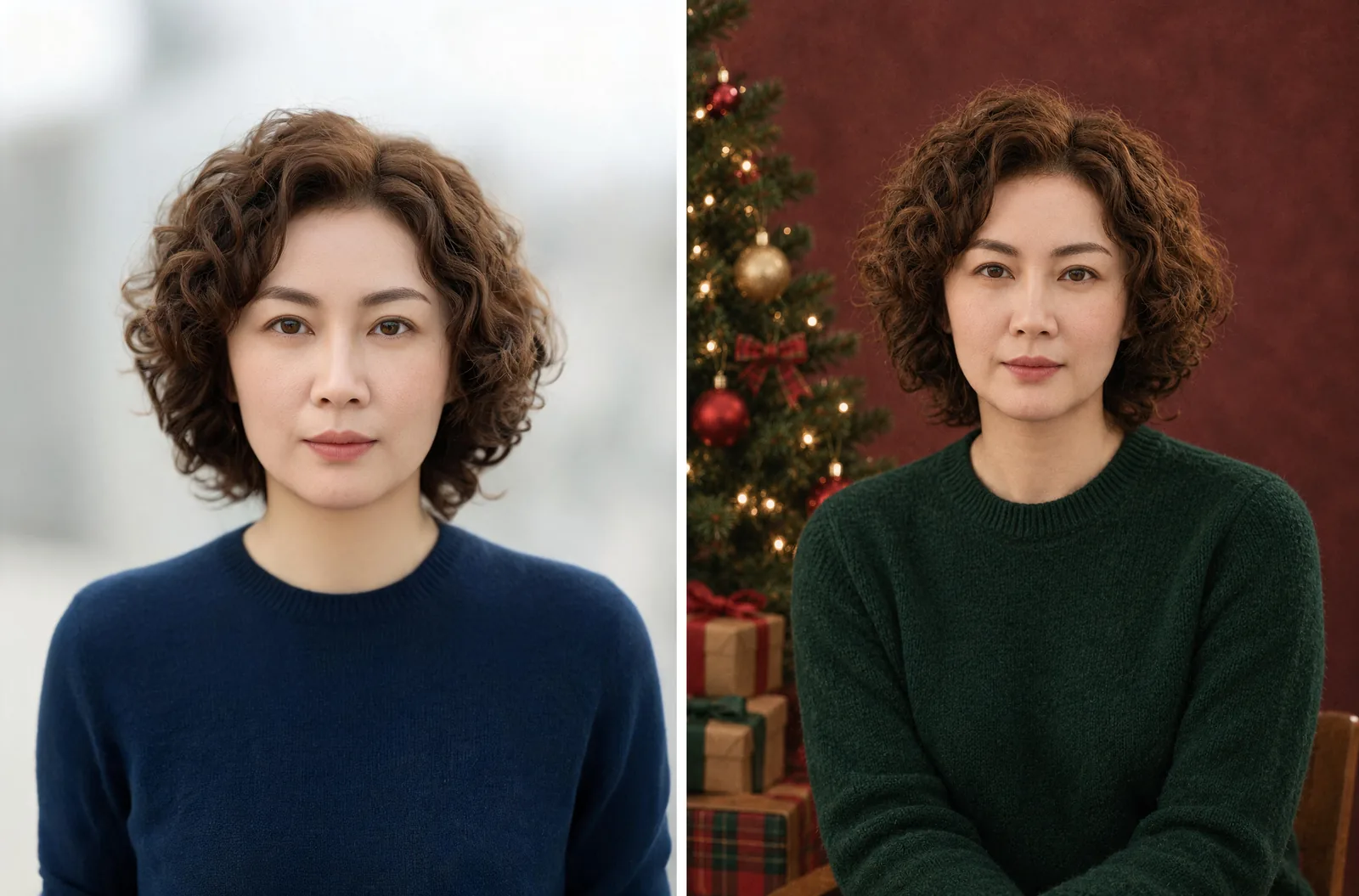
Left: AI-generated fictional reference. Right: Vintage holiday studio edit, GPT Image 2.5, 1K, 3:4.
The forest-green sweater sits against a muted burgundy backdrop, with a decorated tree and wrapped gifts on the left. Those colors and props give the portrait a traditional studio look.
Keep the backdrop and wardrobe colors if you want this palette. For other studio lighting ideas, the AI portrait generator offers editable portrait prompts.
How do you choose a Christmas portrait for your card?
Judge the face before the decorations. Compare the eyes, nose, lips, jawline, and hairline with the original. Save a result only if it still looks like the person you meant to portray; attractive lighting alone is not enough.
The results stop above the waist despite the “waist-up” instruction, and none shows complete hands. The curls also change between edits, especially in the snowy version, so the preservation instruction does not give an exact copy of the source.
All four results leave space above the hair. If you need room for a greeting beside the person, specify which side should stay clear in your prompt, then check the result before cropping. Add the greeting in your card editor after choosing the portrait.
The portrait prompt guide has more examples of lighting and facial-feature instructions. The aspect-ratio guide can help you plan a taller or wider composition.
GPT Image 2.5 requires an account and uses credits. The live pricing page, checked October 7, 2026, lists 3 credits per 1K image. Four separate edits at that setting cost 12 credits; one look costs 3. Check the displayed cost before generating.
Frequently asked questions
How can I turn my photo into a Christmas photo?
Upload a clear portrait, select an image-editing model, and describe one holiday setting, outfit, and lighting style. Ask it to preserve your face and hair. Use one of the prompts above as a starting point, then compare the result with your original.
Is there an AI Christmas photo editor available?
Yes. AI Photo Generator's photo editor accepts a reference image and a Christmas prompt. The four examples here are individual portraits made with GPT Image 2.5; they do not demonstrate family, couple, or pet edits.
Is there a 100% free AI image generator?
AI Photo Generator offers a separate free FLUX.2 [klein] model, subject to usage limits. These Christmas examples used GPT Image 2.5, which costs credits. They show what that model produced; they do not establish the free model's Christmas editing quality.