
GPT Image 2 Prompt Examples for Portraits, Products, and Posters
Copy four GPT Image 2 prompt examples for photos and posters. See GPT Image 2.5 outputs, exact prompts, settings, and details to change for your own project.
A useful GPT Image 2 prompt names the subject, crop, light, materials, and exact wording. Start with one of the four prompts below, then change the details that matter to your project. To try them in AI Photo Generator, select GPT Image 2.5 and set the image shape separately.
Last updated: October 14, 2026 · 6 min read
All pictured results use the site's GPT Image 2.5 (Flare) option. The original GPT Image 2 was not tested.
Which model and settings should you use?
- Sign in and select GPT Image 2.5 under Model. The linked tool pages start with Nano Banana 2.1, so switch explicitly.
- Choose 1K under Quality. Under Size, use 3:4 for the portrait and poster, or 3:2 for the pottery scene and mug.
- Leave the reference area empty and paste the full prompt beside your chosen example. Tool pages pre-fill the prompt box; your replacement prompt goes to the model as typed.
The pricing page, checked October 14, 2026, lists 3 credits per GPT Image 2.5 image at 1K. One generation per prompt would cost 12 credits; reruns cost extra. Here, 1K is the selected Quality setting, not an exact pixel width.
OpenAI's image prompting guide recommends concrete descriptions of the subject, composition, style, and constraints. For lettering, it advises quoting the exact words and specifying their position and typography.
How do you prompt a window-light portrait with visible skin texture?
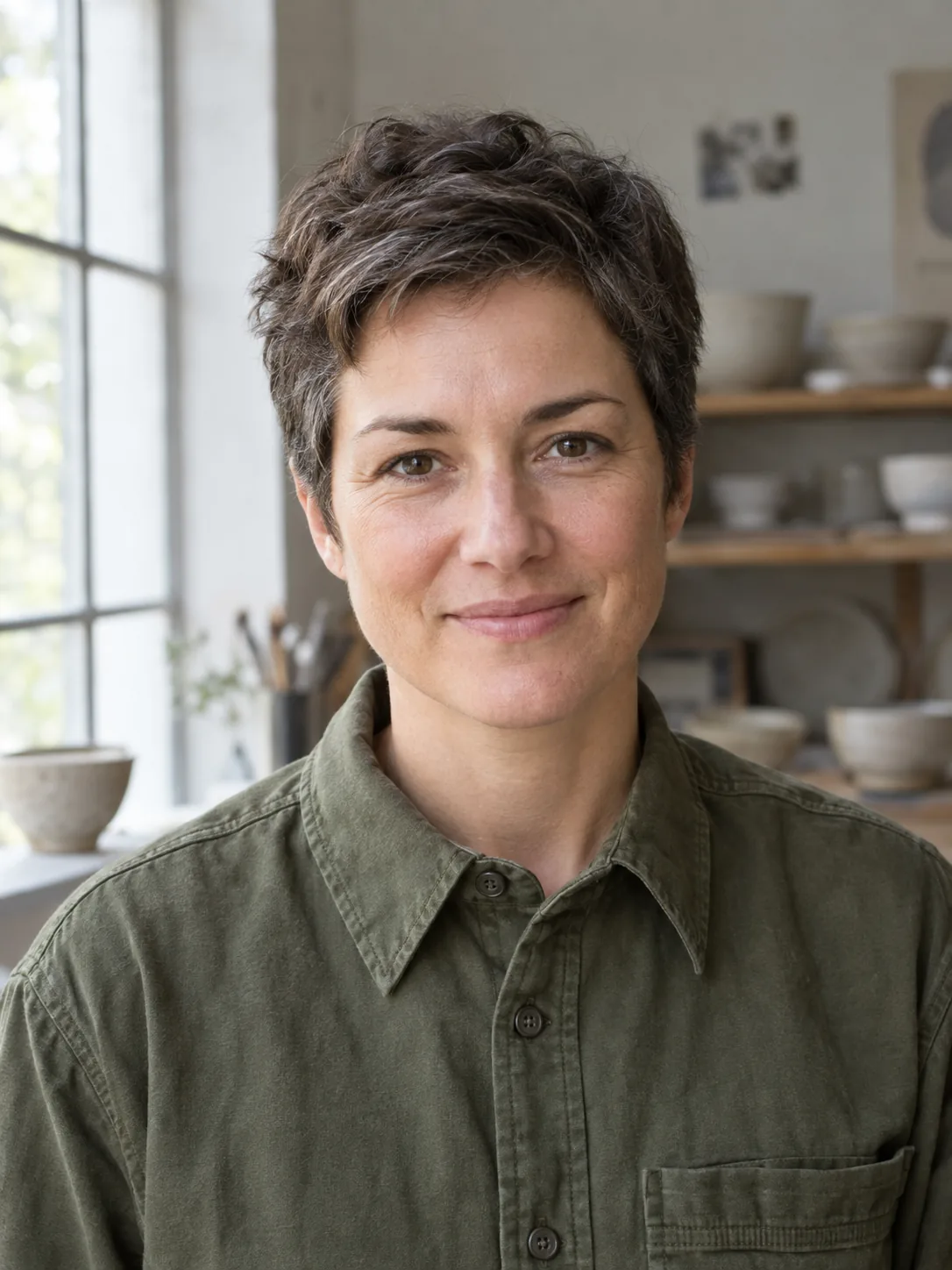
Specify light direction, skin texture, and headroom. Try this prompt in the AI portrait generator with GPT Image 2.5 selected.
Exact prompt:
Create a photorealistic window-light portrait of a fictional adult ceramic artist aged 42, with short dark brown hair lightly streaked with gray, brown eyes and an oval face, wearing a fully covering olive cotton work shirt buttoned to the collar. Frame from mid-chest upward, with the entire head inside the image and space above the hair. The artist faces the camera with a relaxed closed-mouth smile; hands stay outside the frame. Soft daylight enters from a large window on the left. Use a softly blurred pottery studio background with a few pale ceramic bowls. Show natural skin texture, woven cotton and gentle shadows. No text, logos, watermark, extra people or dramatic beauty retouching.
Short-haired ceramic artist in an olive cotton shirt, with window light from the left
GPT Image 2.5, 1K, 3:4. Fictional ceramic artist generated from text alone.
The window appears on the left, with pale bowls on the shelves behind the artist. Fine lines remain around the eyes, the shirt has visible fabric texture, and the hair fits comfortably inside the frame.
For another profession, change the clothing and studio objects. Keep the left-side window and mid-chest crop if you want this lighting and framing.
How do you describe hands shaping clay on a pottery wheel?
Specify hand contact: both hands against opposite sides of one clay cylinder.
Exact prompt:
Create a photorealistic editorial photograph inside a working pottery studio. A fictional adult ceramic artist aged 42 has short dark brown hair lightly streaked with gray, brown eyes and an oval face, and wears a fully covering olive cotton work shirt buttoned to the collar, a charcoal canvas apron and dark pants. Show the artist seated at a pottery wheel, gently shaping one upright cylinder of wet gray clay. Use a three-quarter side view, framed from the knees upward with the entire head visible. Both hands rest naturally against opposite sides of the clay cylinder, with anatomically correct fingers. Soft daylight enters from a window on the left; shelves of unglazed bowls sit in the softly blurred background. Include wet clay texture, small clay marks on the apron and a believable workshop floor. No text, logos, watermark, extra people, extra hands or floating tools.
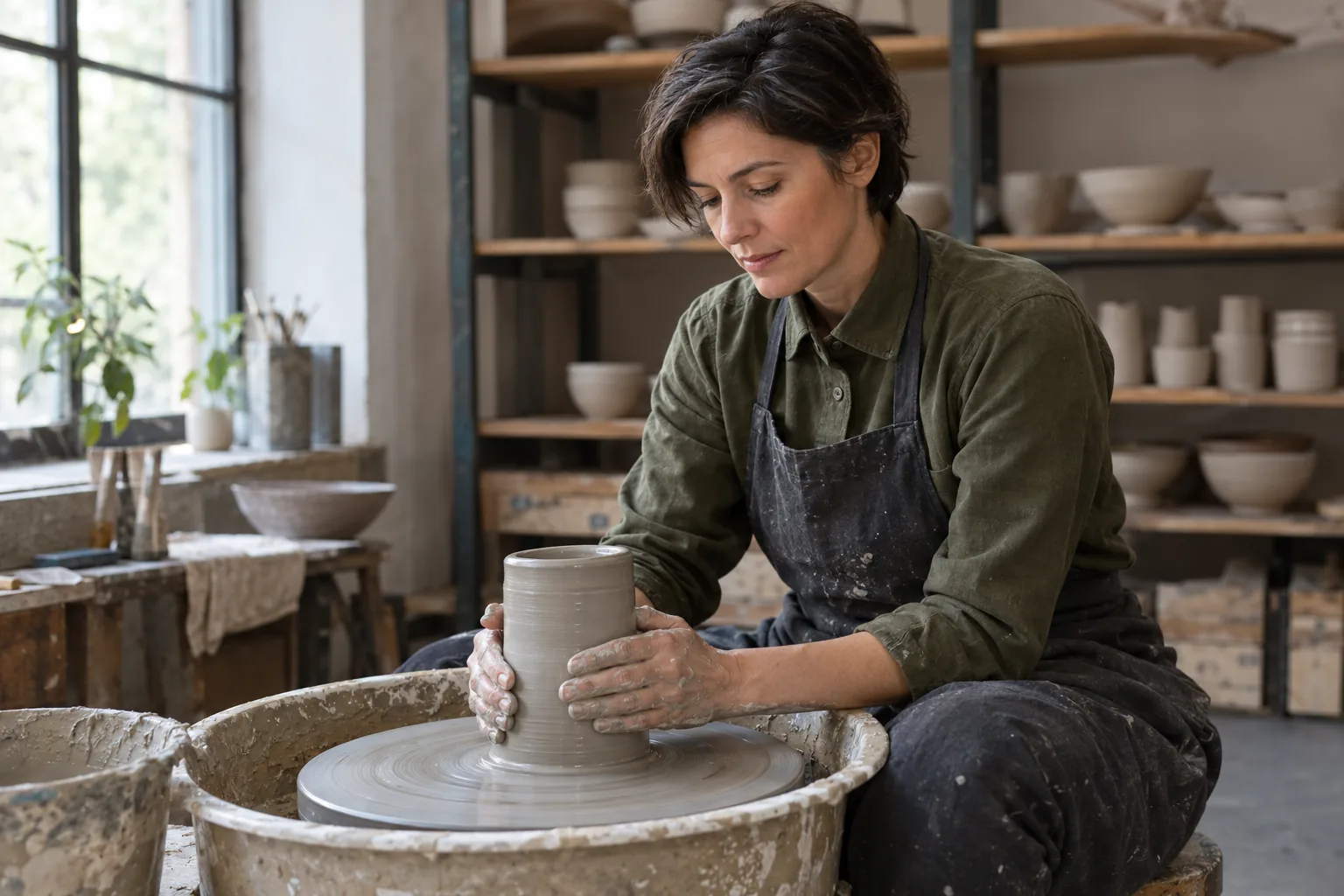
GPT Image 2.5, 1K, 3:2. Pottery-wheel scene generated from text alone; the artist differs from the portrait.
Two clay-covered hands touch the vessel, which sits on the wheel inside a broad tray. The artist's whole head is visible, although there is little space above the hair.
The face and hairstyle differ from the first portrait despite the similar written description. For a series featuring one person, start from a reference photo in the AI photoshoot tool and describe the new action.
When adapting the scene, change the object, hand contact, and camera view together. “Hands holding a finished bowl” asks for a different pose from “hands shaping wet clay.”
How do you prompt a speckled mug on a plain studio surface?
Specify the geometry, finish, viewing angle, and shadow. Use the AI product photo generator for this composition; leave uploads empty for a fictional product like this one.
Exact prompt:
Create a photorealistic studio packshot of one handmade ceramic mug. The mug has a straight-sided cylindrical body, a rounded C-shaped handle on the right, a warm ivory glaze with fine dark brown speckles and a narrow unglazed terracotta foot. Place it upright on a plain pale warm-gray studio surface with no visible horizon line. Use a three-quarter view at mug height so the rim, inside and handle opening are visible. Center the mug with generous space on all sides; keep the whole handle and base inside the frame. Light it with a large softbox on the upper left and a subtle natural contact shadow beneath the base. Show realistic glaze texture and restrained reflections. No people, text, lettering, logos, watermark, extra mugs, flowers, utensils or decorative props.
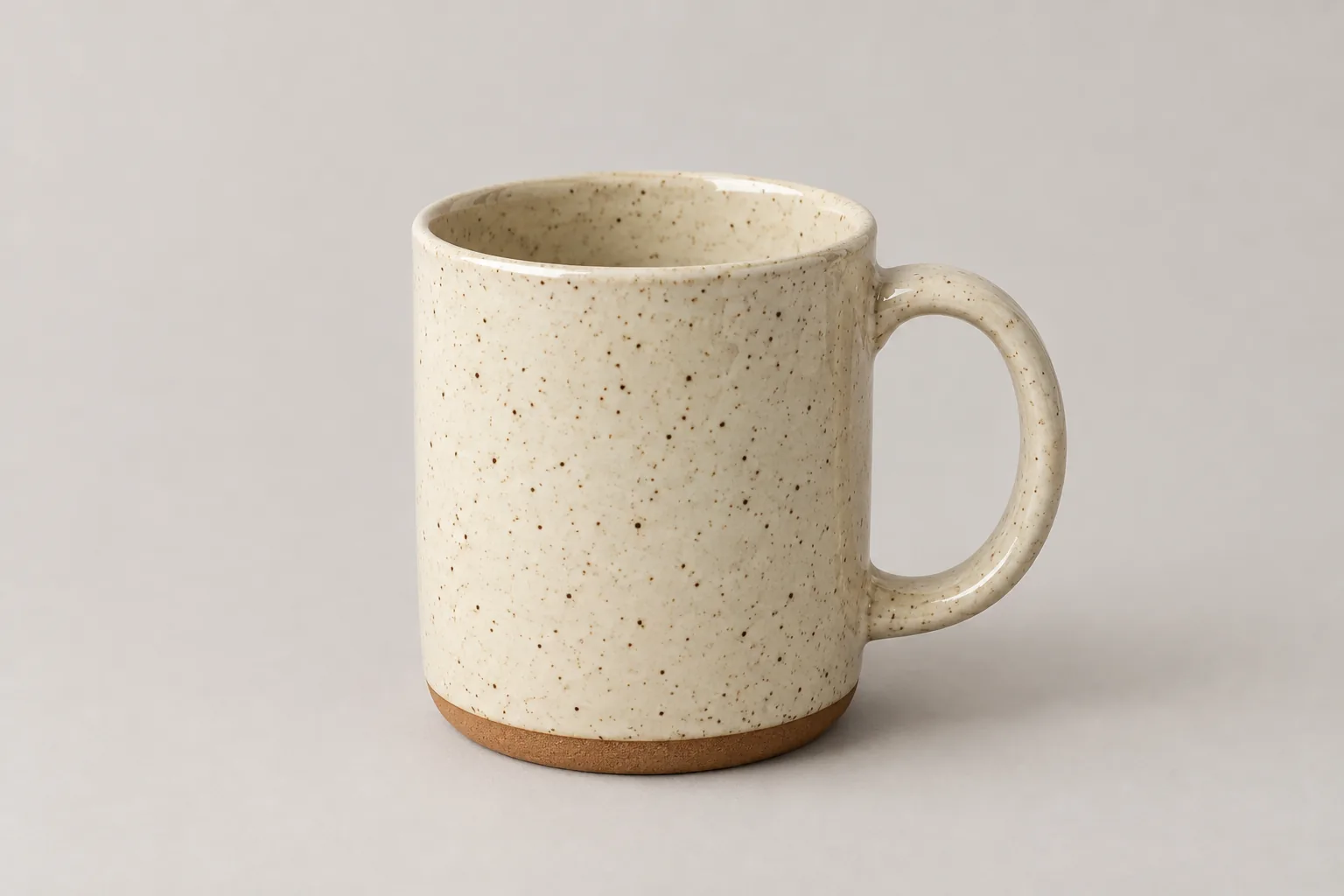
GPT Image 2.5, 1K, 3:2. Fictional speckled mug generated from text alone.
The output has the requested right-side handle, brown speckles, ivory glaze, and exposed terracotta base. The rim and interior are visible, and the whole handle fits in the frame. A soft shadow sits beneath and to the right of the mug.
For a serving bowl, replace the cylindrical body and handle with a broad rim and curved sides. For an actual item for sale, upload its photo and name the shape, finish, and markings to preserve: text alone invents the product's details.
How do you place “CLAY NIGHT” above a poster portrait?
Quote the wording, assign each line a location, and describe where the photograph belongs. Enter both the layout and words in the AI poster generator, then select GPT Image 2.5.
Exact prompt:
Design a vertical pottery-class poster with a warm ivory background, charcoal lettering and a muted terracotta accent. In the upper third, place the exact heading "CLAY NIGHT" in large bold uppercase sans-serif letters, centered. Directly beneath it, place the exact subheading "THURSDAY 7 PM" in smaller uppercase sans-serif letters with generous spacing. These are the only words in the poster. In the lower half, include a photorealistic waist-up portrait of a fictional adult instructor aged 42 with short dark brown hair lightly streaked with gray, brown eyes and an oval face, wearing a fully covering olive cotton work shirt buttoned to the collar and a charcoal canvas apron. Keep the entire head visible below the subheading. The instructor faces the camera with a calm smile; hands are outside the frame. Add one small speckled ceramic bowl near the bottom corner. Use soft window light, clear separation between lettering and photograph, wide margins and a flat front-facing layout. No logos, watermark, extra words, invented dates, distorted letters or additional people.
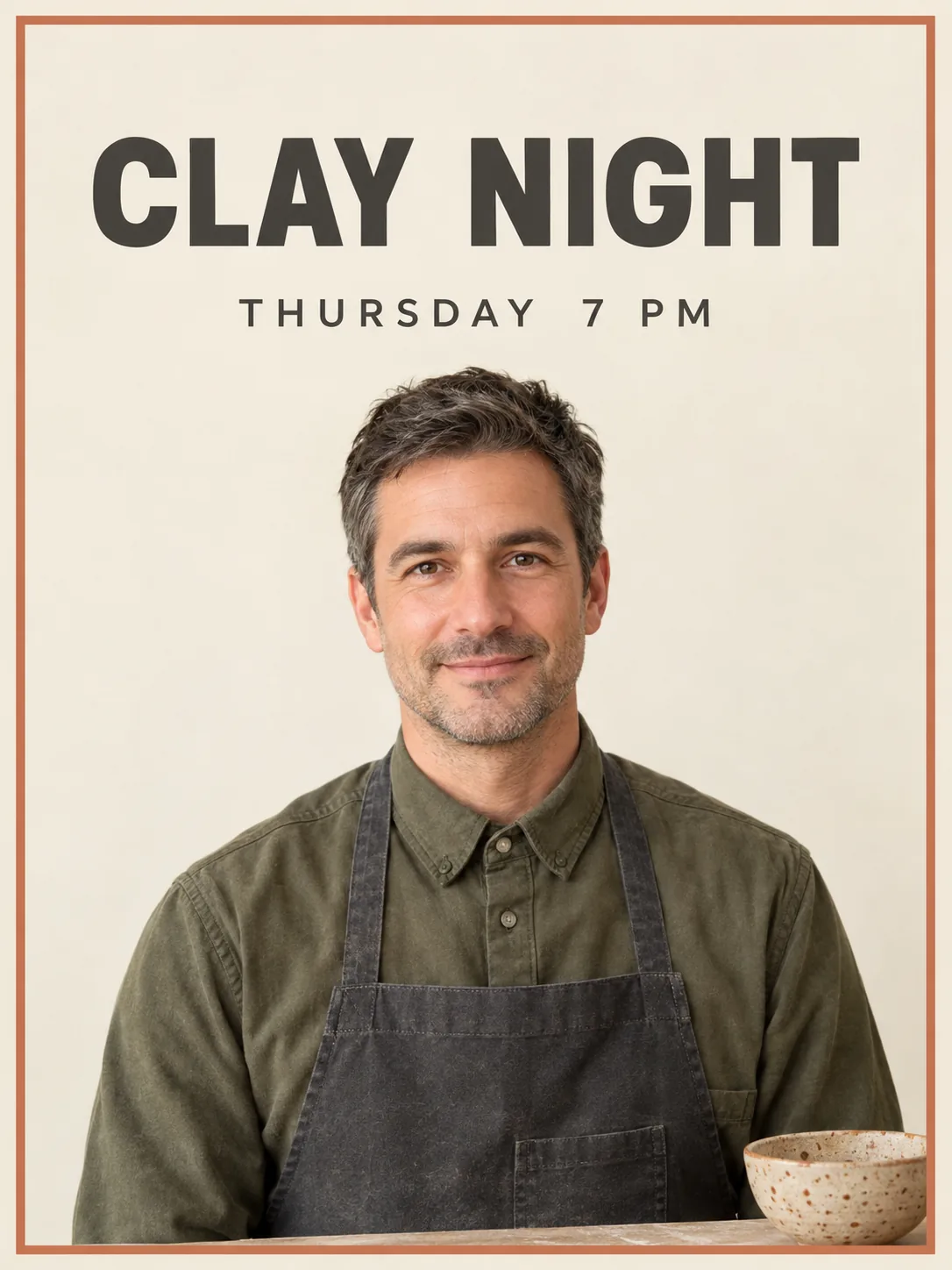
GPT Image 2.5, 1K, 3:4. Fictional class poster with the two requested lines of text.
The poster spells CLAY NIGHT and THURSDAY 7 PM correctly, with no extra wording. Both lines sit above the instructor's head; a terracotta border and speckled bowl complete the design. The portrait extends into the middle of the poster, above the requested lower half.
Replace the quoted strings with your event details, then proofread the downloaded image. For a later time change, the photo text-editing guide shows how to specify old and new words while preserving the design. For letters made from clay or paper, see the decorative word-art examples.
Which prompt details should you change first?
Change the subject-specific details while keeping the framing and light you liked.
| Your goal | Change these details | Keep these instructions |
|---|---|---|
| Another professional portrait | Profession, hair, clothing, background objects | Mid-chest crop, left-side window, headroom |
| Another hands-on scene | Activity, object, hand contact, workshop | One clear action, three-quarter view, whole head visible |
| Another product packshot | Object shape, material, color, handle or openings | Whole object in frame, softbox direction, contact shadow |
| Another event poster | Exact headline, time, palette, instructor description | Heading above subheading, portrait below text, only requested words |
Frequently asked questions
Can I make a portrait without uploading a photo?
Yes. The portrait and pottery-wheel prompts above use text alone to create fictional people. For a portrait of a particular person, upload a clear reference photo and specify the features to preserve.
Will the text on my poster be spelled correctly?
The two short lines in the CLAY NIGHT example are correct. Put your own wording in quotes, specify its position, and read every character in the output before using it.