
Nano Banana 2.1 vs Nano Banana 2: Posters, Photos, and Edits
Nano Banana 2.1 vs Nano Banana 2: compare real poster and portrait results, current credits, and a copper-bottle test with GPT Image 2.5.
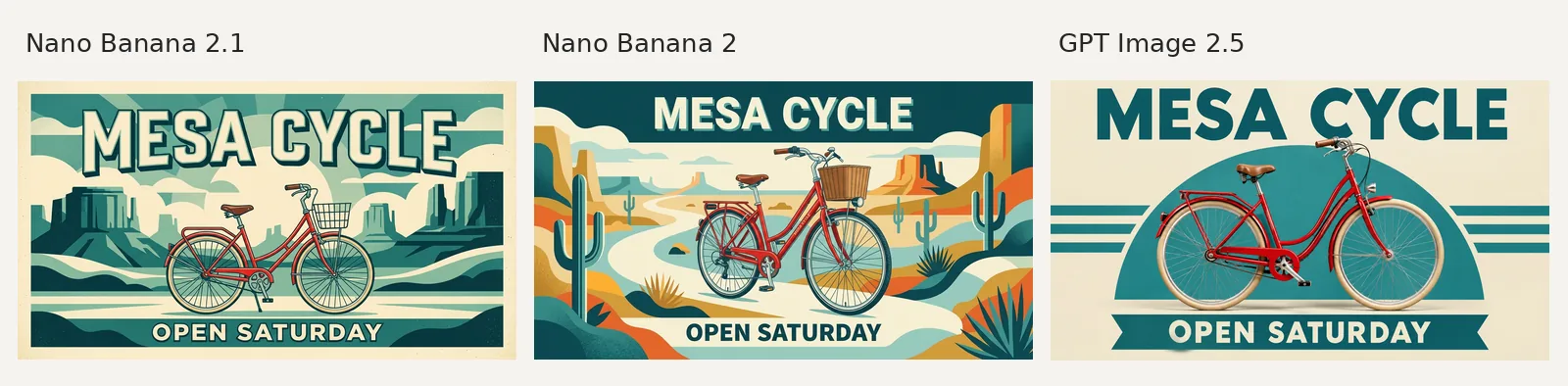
Nano Banana 2.1 costs fewer credits than Nano Banana 2 on AI Photo Generator, but these results show tradeoffs: both spell the poster correctly, while Nano Banana 2 keeps the portrait's freckles more visible. GPT Image 2.5 produces the simplest poster layout. Start with 2.1 for cost; compare portrait details before switching.
Last updated: October 13, 2026 · 6 min read
What changes when you switch to Nano Banana 2.1?
Google describes Nano Banana 2.1 as an update to Nano Banana 2, with improvements in realism, prompt following, text rendering, and character consistency across successive edits. These are Google's stated improvements; our examples show one attempt per model for each prompt, with a single background edit rather than a series of edits. Google's model documentation
As of October 13, 2026, AI Photo Generator offers text-to-image generation and photo edits with both models. Nano Banana 2.1 accepts up to 10 reference photos; Nano Banana 2 accepts up to 14, according to the homepage's model cards. Both offer 1K, 2K, and 4K output. The live 2.1 picker shows eight shapes: 1:1, 9:16, 16:9, 4:3, 3:4, 3:2, 2:3, and 21:9.
The site's live pricing page lists the following costs as of October 13, 2026:
| Model | 1K | 2K | 4K |
|---|---|---|---|
| Nano Banana 2.1 | 2 credits | 3 credits | 4 credits |
| Nano Banana 2 | 4 credits | 5 credits | 8 credits |
| GPT Image 2.5 | 3 credits | 4 credits | 7 credits |
At 1K and 4K, 2.1 uses half as many credits as Nano Banana 2. That makes it cheaper to try, but the pictures below give separate reasons to choose each model. All attempts used the 1K quality setting; actual pixel dimensions vary and appear in the captions.
Which bicycle poster makes the lettering easiest to scan?
A shop poster needs its name and opening information to read at a glance. This 16:9 prompt specifies two lines but leaves the illustration style open:
Create a landscape poster for a fictional bicycle shop. The only lettering is exactly "MESA CYCLE" and "OPEN SATURDAY". Show one red city bicycle against a cream and teal graphic background; large readable lettering, balanced margins, no other words.
Left to right: Nano Banana 2.1, Nano Banana 2, GPT Image 2.5; each at 1K, 16:9. Original outputs: 1,376 × 768 pixels for both Nano Banana models; 1,672 × 940 for GPT. Images reduced to fit the panel.
All three spell both requested lines correctly. This short-copy example shows a tie on spelling, with a clearer difference in composition.
Nano Banana 2.1 makes a bordered desert illustration. Its outlined headline fills the top, and the opening line sits in a dark strip at the bottom. The bicycle has a wire basket, with teal rock formations behind it.
Nano Banana 2 makes a busier scene: cacti, orange cliffs, a winding path, and a woven basket. Its cream headline stays readable against the dark teal sky. Choose this result if you want the desert setting to take up more of the design.
GPT Image 2.5 gives the bicycle a more photographic finish and places it against a teal semicircle and horizontal stripes. With fewer background details and plain, bold type, it is our pick for a poster people need to scan quickly. Nano Banana 2.1 is the better fit here if you prefer the illustrated print style.
The AI poster generator has editable prompt examples for shop signs and events. For longer copy, the Nano Banana 2.1 poster examples include headlines, discounts, and credit lines.
How do the copper-bottle photos differ?
The second request removes labels so the metal, light, and bottle shape are easier to compare. We selected 4:3:
Photorealistic product photo of a plain copper water bottle on a dark slate counter, natural window light from the left, visible brushed metal texture and realistic reflections, entire bottle visible, no text or logos.
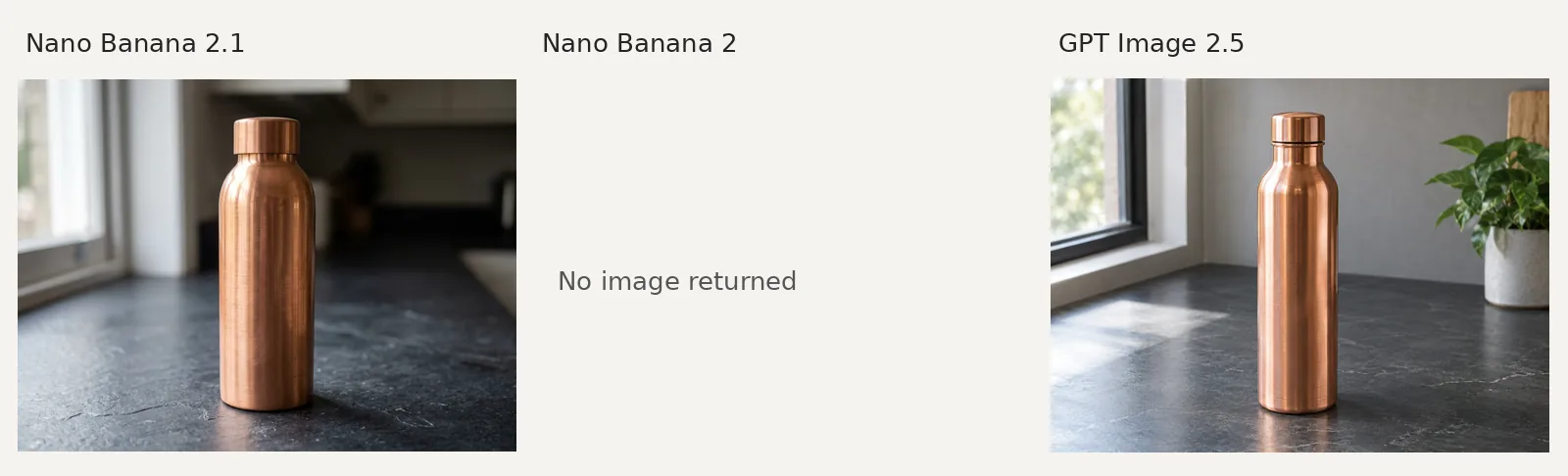
Left: Nano Banana 2.1, 1K, 4:3, 1,200 × 896 pixels. Center: Nano Banana 2 attempt at 1K, 4:3; no image returned. Right: GPT Image 2.5, 1K, 4:3, 1,448 × 1,086 pixels. Successful images reduced to fit the panel.
Nano Banana 2.1 shows a bottle with broader shoulders against a dark, blurred room. A bright highlight runs down its left side, and the slate has a rough, uneven surface. GPT Image 2.5 makes a slimmer bottle in a brighter room, with a plant on the right and a stronger reflection beneath the base.
Both successful images show the whole bottle, copper-colored metal, and window light from the left. Pick between them by bottle shape and room brightness. Nano Banana 2 returned no image, so this example cannot settle the 2.1-versus-2 product-photo question or establish which model is more reliable.
These are invented bottles from a text prompt. The AI product photo generator offers upload-based examples for actual merchandise. Use a photo of your item when its shape, label, and finish need to match, then compare the result with that source.
Does the bookshop edit preserve the portrait's details?
The source is a fictional adult woman in a mustard shirt, with short dark curls and freckles. Each model received the same original portrait, the 3:4 setting, and this instruction:
Replace only the background with a rain-lit bookshop; preserve the face, freckles, hair, shirt and pose.
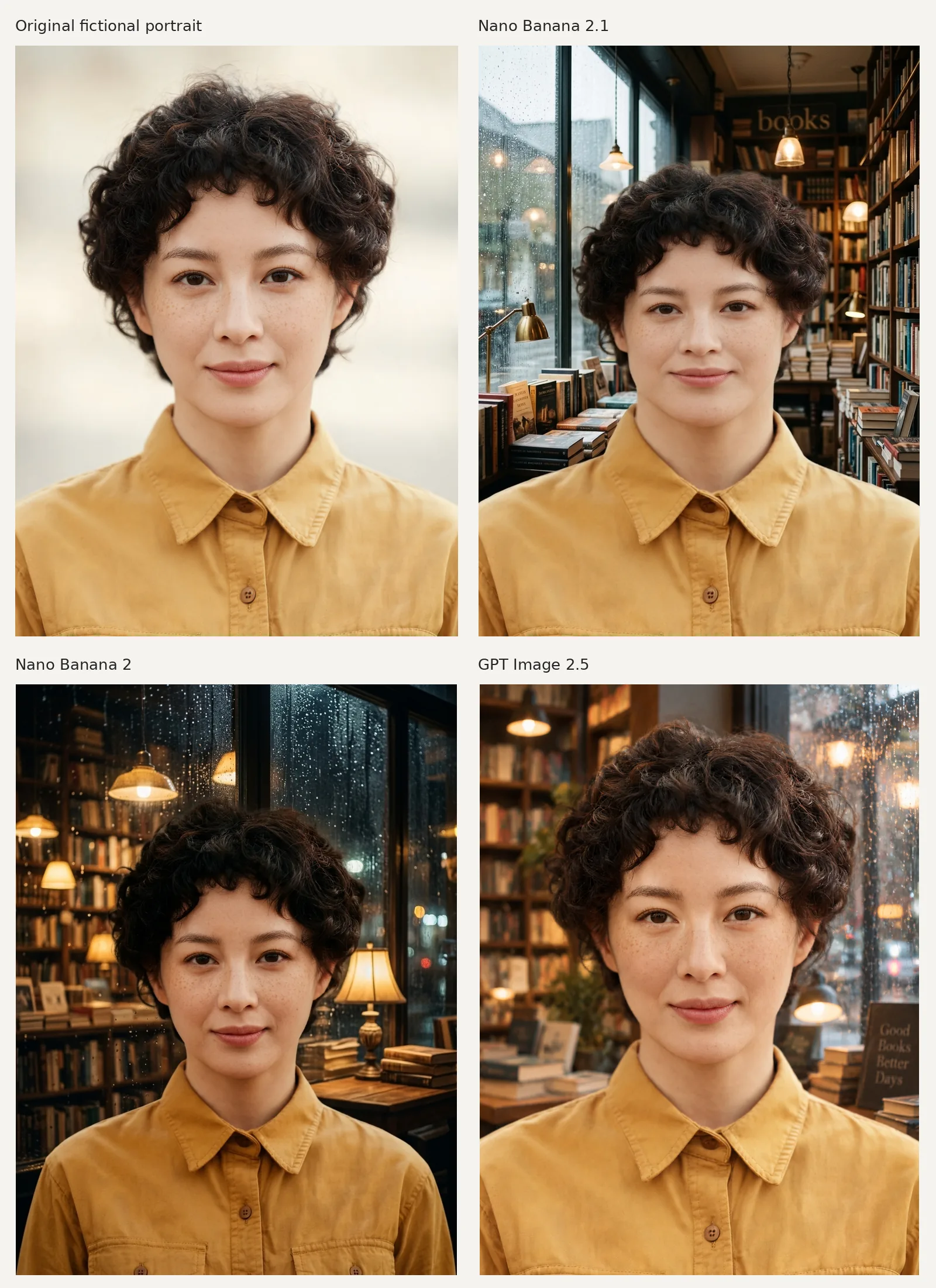
Top left: fictional source, 1,728 × 2,304 pixels. Top right: Nano Banana 2.1, 1K, 3:4, 896 × 1,200. Bottom left: Nano Banana 2, 1K, 3:4, 896 × 1,200. Bottom right: GPT Image 2.5, 1K, 3:4, 880 × 1,184. Images reduced to fit the panel.
Nano Banana 2.1 places her beside a rainy window, tall bookshelves, and hanging lamps. It keeps the short curls, mustard shirt, and forward-facing pose, with framing closer to the source than Nano Banana 2's result.
Nano Banana 2 keeps the freckles more visible than 2.1, but pulls back to show more of her shirt and upper body. It gives the bookshop a darker mood, with rain-speckled glass and warm lamps. Nano Banana 2.1 lightens the freckles, so neither result preserves every requested detail unchanged.
GPT Image 2.5 also keeps the freckles visible and uses a closer crop than Nano Banana 2. Its brighter shop has softer shelves and a small sign reading “Good Books Better Days.”
For this portrait, choose Nano Banana 2 if visible freckles matter most, or 2.1 if the framing matters more. Compare the face with the upload before keeping an edit. The AI photo editor has background-change examples; its tool prompts remain editable and are sent to the model as typed.
Which model would we pick for these three jobs?
| Job | Pick from these outputs | Reason |
|---|---|---|
| Bicycle poster with two short lines | GPT Image 2.5 for simple layout; Nano Banana 2.1 for illustrated style | All three spell the lines correctly; composition decides |
| Copper-bottle scene | Nano Banana 2.1 for a darker room; GPT Image 2.5 for a brighter one | Both show the full bottle; Nano Banana 2 has no result to compare |
| Bookshop portrait edit | Nano Banana 2 for freckles; Nano Banana 2.1 for framing | The older model keeps freckles clearer but widens the view |
These results support starting with the cheaper 2.1 and switching when a particular detail falls short. They give no reason to pay more for Nano Banana 2 just to spell these two poster lines, but its portrait is worth comparing when small facial details matter. The earlier Nano Banana versus GPT Image portrait and pottery-poster comparison covers another set of subjects.
To compare your own prompt:
- Open the homepage generator and choose Nano Banana 2.1 in the model picker. The New · Nano Banana 2.1 chip above the main heading also selects it.
- Paste your prompt, add the original photo if you are editing, and choose Size for the aspect ratio and Quality for 1K, 2K, or 4K. Generate once, then switch models with the same prompt, settings, and original upload.
- Download the results and compare what matters for the job: every letter on a poster, the shape of a product, or the face and framing in a portrait.
Frequently asked questions
Is Nano Banana 2.1 better than Nano Banana 2?
It costs fewer credits on AI Photo Generator as of October 13, 2026, but these outputs show tradeoffs. Both models spell the bicycle poster correctly. Nano Banana 2 keeps the portrait's freckles clearer, while 2.1 stays closer to its original framing. We have no Nano Banana 2 bottle result to compare.
Which Nano Banana model is best for text in images?
Nano Banana 2.1 and Nano Banana 2 both spell the two short poster lines correctly here. That leaves no spelling winner between them for this prompt. GPT Image 2.5 produces our preferred simple layout. Longer copy, small labels, and text inside photo scenes need separate comparisons.
What resolution does Nano Banana 2.1 support?
AI Photo Generator offers 1K, 2K, and 4K as of October 13, 2026. Every example above used 1K. The captions list the original pixel dimensions because the same quality setting can return different dimensions across models.