
Nano Banana vs GPT Image: Which Fits Portraits and Posters?
Nano Banana vs GPT Image: compare matched portrait edits and pottery posters from Nano Banana 2 and GPT Image 2.5, with results, sizes, and credits.
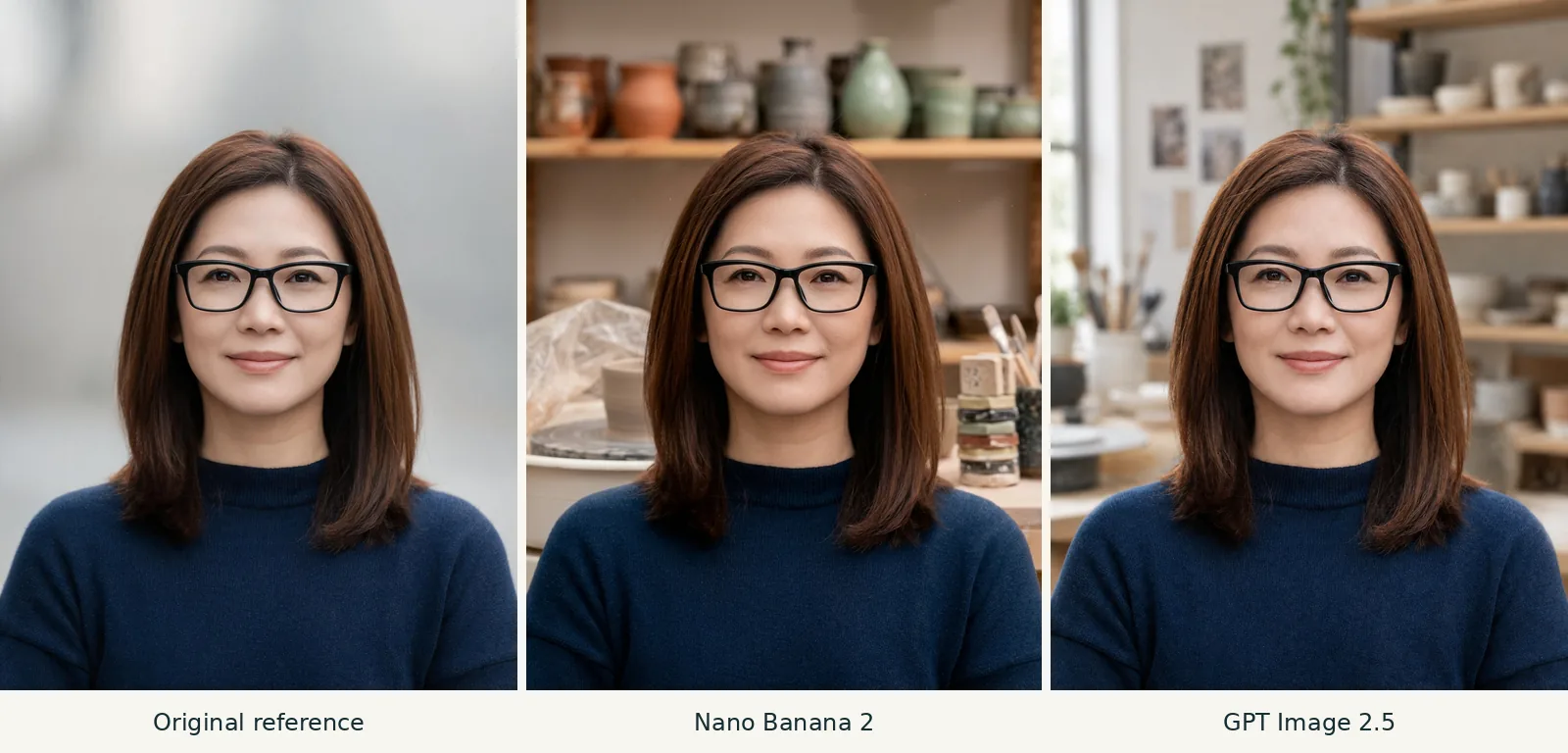
For Nano Banana vs GPT Image, GPT Image 2.5 is the better fit for the softly blurred portrait background shown here. Nano Banana 2 gives the pottery poster a vintage illustrated look; GPT gives it a photographic scene. Both spell the requested text correctly. You can use either model in AI Photo Generator.
Last updated: October 5, 2026 · 5 min read
Which Nano Banana and GPT Image versions are compared?
These results use Nano Banana 2 and GPT Image 2.5, the names in the site's model picker. The GPT option uses the Flare version for both generation and editing. Nano Banana Pro is a separate choice and wasn't used here.
Each model received the same portrait and background-edit instruction, then the same poster prompt without an uploaded image. There is one output per model per task, all with the 1K setting. That is enough to compare these designs; consistency across repeated runs and generation speed remain untested.
To make a similar portrait comparison in the AI photo editor:
- Upload the original portrait. The uploader accepts JPG, PNG, and WebP, up to 8 MB per file.
- Select Nano Banana 2, 3:4, and 1K, then paste the background instruction below and generate.
- Select GPT Image 2.5 and repeat with the original upload, instruction, ratio, and size setting. Compare each result against the original.
The prompt you enter is sent to the selected model. Tool pages provide starting prompts you can replace.
Which model gives the portrait a softer studio background?
The reference is an AI-generated fictional woman described as 35, with shoulder-length brown hair, black rectangular glasses, and a navy crew-neck sweater. Both models received that same reference with this instruction:
Replace only the background with a softly blurred ceramics studio. Preserve her face, glasses, hair, expression, sweater and framing; keep natural skin texture.
Left: fictional original, 1680 × 2240 px. Center: Nano Banana 2, 1K, 3:4, returned 896 × 1200 px. Right: GPT Image 2.5 (Flare), 1K, 3:4, returned 1086 × 1448 px. Complete images are resized to equal panel height for comparison.
Both edits keep the woman recognizable, with black glasses, a closed-mouth smile, brown hair, and the navy sweater. Her whole head remains visible in each panel. Recognizable likeness alone doesn't establish that every facial detail is unchanged.
GPT Image 2.5 follows “softly blurred” more closely. The shelves and ceramics recede into a softer background, with a bright window on the left. Nano Banana 2 leaves the stacked supplies beside her shoulder more distinct. Its setting is easier to recognize as a working studio, but those objects compete more with the face.
For this background-only request, I would choose the GPT result. If showing the studio equipment matters more, the Nano Banana result has the advantage.
Before keeping your own edit, compare the glasses bridge, eyebrows, mouth, and sweater neckline against the reference. The Nano Banana glasses-editing guide gives another example of judging a small change against an original portrait.
Which model makes the clearer pottery poster?
Both posters get the lettering right. Their main difference is style: Nano Banana 2 uses illustration, while GPT Image 2.5 uses a photographic scene. The prompt didn't specify either style.
The AI poster generator starts with a 2:3 canvas and GPT Image 2.5 selected. Switch to Nano Banana 2 for the other version, keeping 2:3 and 1K. Leave the reference upload empty: the women in these posters are new fictional subjects, separate from the portrait above.
Both models received this exact prompt:
Create a cream-and-teal pottery workshop poster featuring an original fictional adult woman aged 35 shaping a clay bowl, fully clothed. Put POTTERY NIGHT at the top and FRIDAY 7 PM at the bottom, exactly as written. Keep the lettering clear and separate from her face and hands.
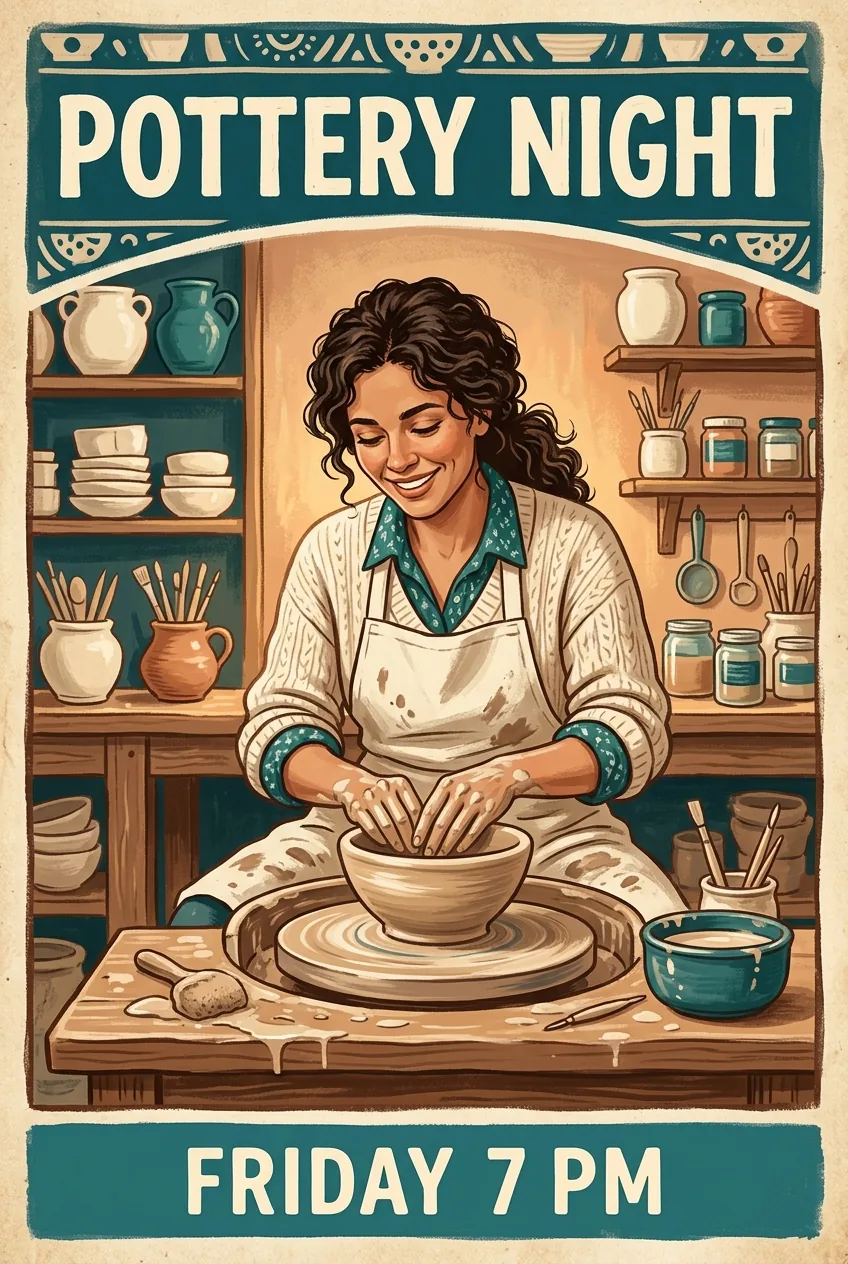
Nano Banana 2, 1K, 2:3, returned 848 × 1264 px. Generated from the poster prompt above, with no reference image.
Nano Banana 2 puts “POTTERY NIGHT” on one line across a teal band and “FRIDAY 7 PM” in a matching bottom band. Shelves of pots, brushes, and a patterned border give it a decorative workshop feel. The woman wears a shirt and apron, with both hands meeting the bowl at its center.
This is my pick for a vintage illustrated event poster. The headline stays compact, leaving room for the pottery scene and its surrounding detail.
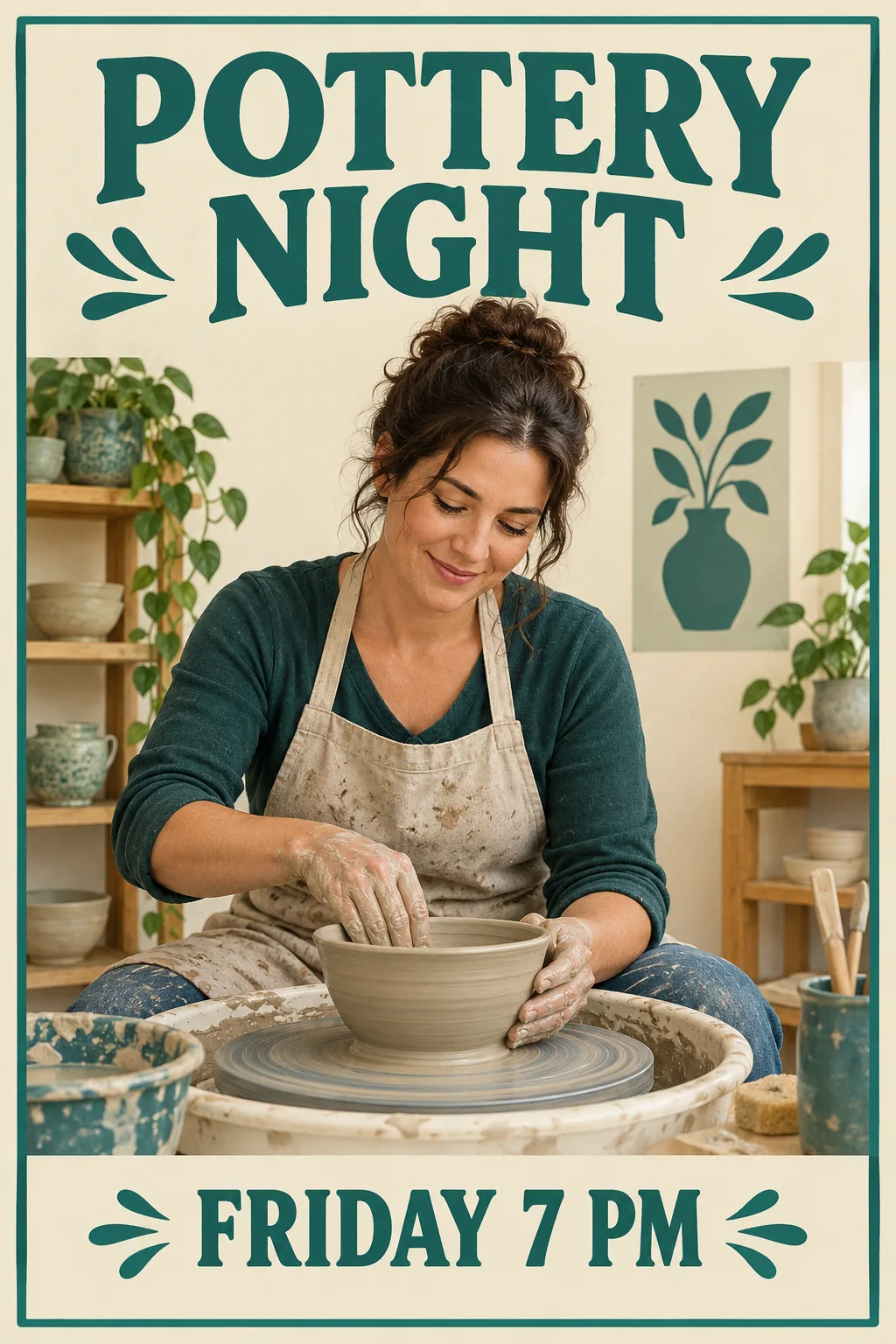
GPT Image 2.5 (Flare), 1K, 2:3, returned 1024 × 1536 px. Generated from the identical poster prompt, with no reference image.
GPT Image 2.5 gives the headline two large lines above the scene. The woman wears a teal top and a clay-stained apron; one hand reaches inside the bowl while the other supports its outer wall. Her pose and the clay on her hands make the workshop activity easy to understand.
Choose this version if you want the poster to resemble an actual pottery class. Both outputs keep the required words clear of the face and hands, and neither shows an obvious extra hand or disconnected wrist at the displayed size. Neither includes a venue or booking information, which the prompt didn't request.
For a specific look, add “vintage illustration” or “photographic workshop scene” to the prompt. Treat the two styles here as choices these outputs made, rather than fixed traits of either model.
How much do Nano Banana 2 and GPT Image 2.5 cost here?
| AI Photo Generator option | Nano Banana 2 | GPT Image 2.5 |
|---|---|---|
| 1K image | 4 credits | 3 credits |
| 2K image | 5 credits | 4 credits |
| 4K image | 8 credits | 7 credits |
| Maximum reference photos | 14 | 16 |
| Portrait shown | More distinct studio supplies | Softer studio background |
| Poster shown | Vintage illustration; one-line title | Photographic scene; two-line title |
These credit prices appear on the live pricing page, checked October 5, 2026. GPT Image 2.5 costs one fewer credit at each listed size. Both models require sign-in and use credits. The separate free model, FLUX.2 [klein], produced none of these examples.
The matching 1K setting did not produce matching pixel dimensions, as the captions show. Both portrait edits also contain fewer pixels than the original reference. Judge likeness in the comparison strip, then inspect the downloaded files for detail at the size you need.
Keep 3:4 for a portrait like this and 2:3 for a tall poster. The Nano Banana aspect-ratio guide explains the available shapes. A larger resolution setting and a different aspect ratio are separate choices.
Frequently asked questions
Is nano banana or GPT image better?
For the background instruction shown here, GPT Image 2.5 gives the closer match because its studio is more softly blurred. For the poster, both spell the text correctly: choose Nano Banana 2's vintage illustration or GPT Image 2.5's photographic scene based on the look you want.
Does nano banana degrade image quality?
The Nano Banana 2 edit keeps the subject recognizable, but its 896 × 1200 px output has fewer pixels than the 1680 × 2240 px reference. The GPT edit is also smaller than the reference. Check output dimensions and facial detail separately; this single background edit cannot establish how quality changes across repeated edits.